SUP.02 When is an Error an NWBC Error? 
Symptom
Often we get problem tickets of the nature “When doing ... we get a dump ...”.
Solution
However, one should clearly first understand what NWBC is, and based on this information, decide whether it is a NWBC error or not. NWBC is effectively a shell that is able to run different types of applications. Problems that occur on the shell belong to NWBC. Any problems that are related to the canvas, effectively belong to the application running in the canvas and usually have nothing to do with NWBC.
Of course, there is no clear and simple rule that will work in most cases. But do consider the following guideline when opening a problem ticket:
Issue |
Component for Processing |
|---|---|
The problem is directly related to or visible on the shel. |
BC-WD-CLT-BUS |
The problem occurs in the canvas with a personal object worklist (POWL) running. |
BC-MUS-POW |
The problem in the canvas is related to the underlying Web Dynpro application. |
BC-WD-ABA |
The problem in the canvas is related to rendering errors in a SAP GUI transaction. |
BC-FES-GUI |
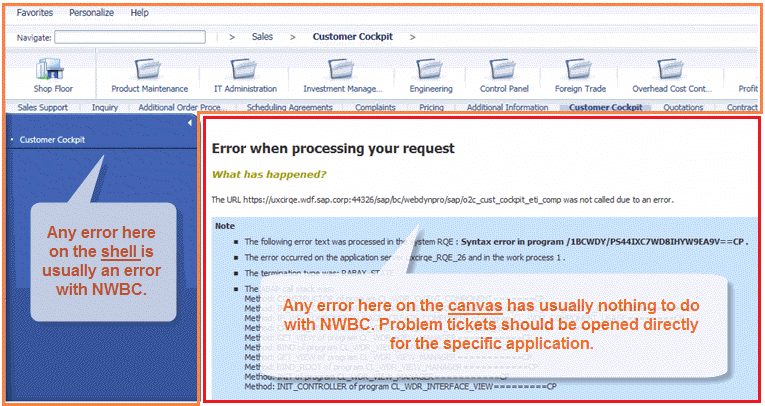 (Error example)
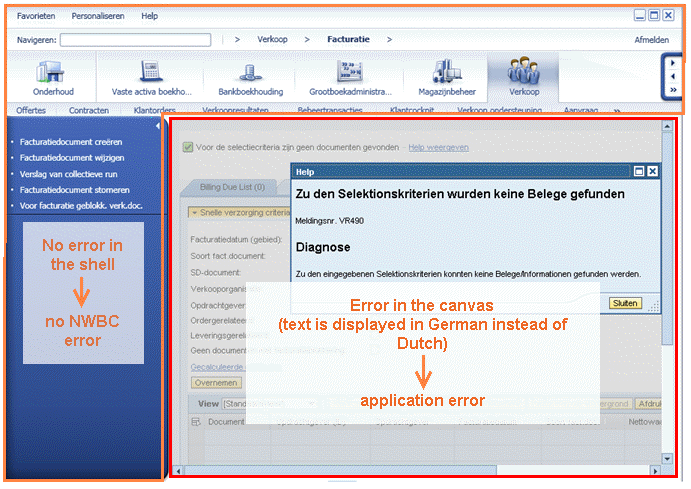 (Another error example)