Parameterizing the TCD Command
Interface
Parameterizing the TCD Command
Interface

Use
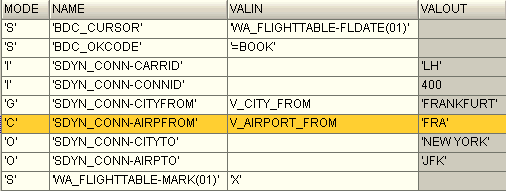
You can parameterize the input and output fields of screens. Regardless of the type of parameterization, you always enter the parameter in the VALIN column of the command interface. The content of the Mode column determines whether a field is for input or output, and after parameterization, whether it is for setting, getting, or checking the field value.
Parameterizing Input Fields
You must set the field mode to ‘S’, and enter a literal or the name of a parameter in the VALIN column. At runtime, the screen field will be filled with the value that you specified.
Parameterizing Output Fields
Reading a Value
You must set the field mode to ‘G’, and enter the name of a parameter in the VALIN column. At runtime, the parameter will be filled with the value from the screen field.
Checking a Value
You must set the field mode to ‘C’, and enter a literal or the name of a parameter in the VALIN column. At runtime, the screen field will be checked against the value that you specified. If the values are different, the script will fail.
Procedure
1.
In the
parameter list, select the command interface and choose  .
.
The command interface is displayed in the structure editor.
2. Expand the tree until you see the screen and fields that you want to parameterize. For example:

3. Double-click the Field node to open the fields for editing.
4. In the Mode field, select ‘S’, ‘G’, or ‘C’, as appropriate.
5. In the VALIN field, enter a parameter name (or literal, if appropriate). For example: