5.11.3 Defining an OBN Target 
The process to map one OBN onto a target application starts by selecting the target application and then configuring that this application can handle a specific OBN call. We assume from the above steps that the OBN data is now known.
 (OBN maintenance in PFCG)
In the PFCG Menu tab select the item you want for the target application, and choose Other Node Details.
In the Object-Based Navigation section choose the icon for Insert Method, enter the name of the business object and the required method, and confirm your entries. The object can either be selected from the Business Object Repository, or can be freely defined. Both the object type as key and the description (the actual key that is used) must be defined. For example define SLSORDER as object type and SalesOrder as description. Similarly, for the method, if a BOR object is referenced, the method can be selected, otherwise it must also be freely defined. Again, both the key and the description are needed. For our example, we could define DISPLAY as key and Display as method description.
Assign a priority, specify whether the OBN call should be displayed in a separate window or in the same window, and under Mapping of Parameters choose the icon for Insert Parameter. Priority values are used in the final OBN resolving in cases where more than one application is available for the same OBN target. In this case, the target application with the highest priority is selected. Priority is defined in descending order, with the highest number being the highest value.
Now you can insert as many parameters as you want, and assign them values for the mapping. Within the table, the left column contains the parameter names of the target application. These are the parameters that will be used to start the application and thus must be exactly the list of parameters that the application is expecting. In the right column the values are listed that will be set for each parameter. Each value can either be directly set or be taken from the parameters supplied for the OBN call. In this second case, use for the value of the OBN parameter name in curly brackets, the actual value will then at runtime be taken from the value supplied in the OBN call.
Save your entries.Your entries are listed in a table under the Object-Based Navigation section. Here you can display entries individually, insert additional methods, and delete entries from the list.
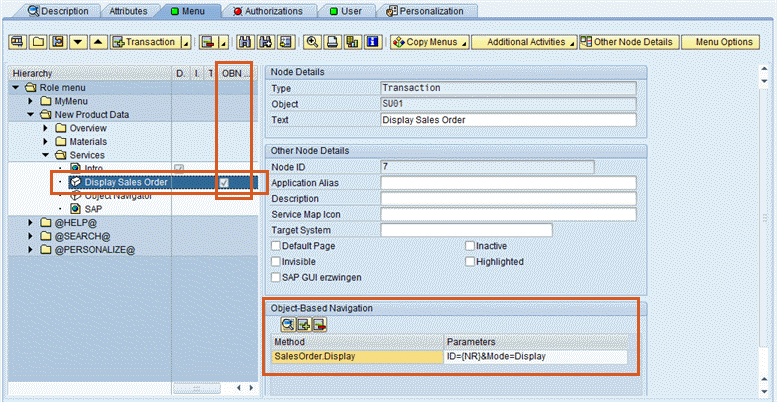 (OBN maintained in PFCG)