OBN.02 Failed to Resolve Object-Based Navigation 
Symptom
OBN calls are similar to carrying out a phone call. Assume person A wants to call person B and dials the number 12345. Then, at the phone company, seen is only an incoming number 12345. If this number is unknown, then the phone company has no information about why A wants to dial 12345, no information about B and definitely no possibility to connect A to B. OBN calls are similar to phone calls, and here NWBC is the phone company.
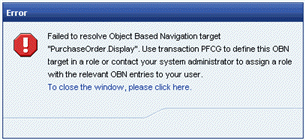 (OBN error)
For example, we see that an application wishes to reach the target “PurchaseOrder.Display. However, if the information has not been configured, NWBC has no possible way to resolve this call. To be very clear, this is not an error within NWBC, but usually a configuration error in the applications, the roles created or the roles assigned to the user.
Solution
Below are possible ideas in how to attempt to resolve this problem.
One idea would be to check whether there are other roles defined that already have a definition for this target OBN. It could be that the user is just missing this role assignment. As a first step, use from transaction SE38 the report NWBC_LIST_OBN_TARGETS with the input parameter the OBN target that needs to be resolved. Compare the found roles to the roles that have been assigned to the user (can be seen in transaction SU01).
In this example, we see within transaction SU01 for the specific user a number of SAP_BC_EPM_* roles assigned. In addition, we see that there is one extra role that matches the same naming pattern and that contains the target OBN that has not been assigned to the user. It could be that the user is just missing the assignment of this additional role. Note that one needs a detailed insight into all roles and their functionality to know whether assigning of the role to the user in the specific context is correct. This can only be decided after consulting the application documentation.
 (SU01 and report NWBC_LIST_OBN_TARGETS)