
 Making Your Script Ready for Data
Input
Making Your Script Ready for Data
Input

When you define import or export parameters in a test script, the test script is no longer restricted to being a standalone test but can be used as part of a more complex test. The main uses for import parameters are:
· Receiving data from other test scripts. You can reference one script in another.
· Receiving data from test configurations.
In the tutorial so far, every time you made a new booking you used the same passenger details. By changing the fixed values recorded in the test script to import parameters, you enable the test script to use a different set of data for each test run.
Procedure
1.
In the test
script editor, use the search function  to find the name
Smith that
you record earlier. The search result indicates which command interface to
parameterize.
to find the name
Smith that
you record earlier. The search result indicates which command interface to
parameterize.

2. Open the command interface in the structure editor and expand tree as shown below.

3. Double-click the ‘ Smith’ node so that the value appears for editing on the right.

4. Change the value to I_NAME (without inverted commas because it is a parameter name).

5. Choose Enter.
6. In the Parameter Maintenance dialog, select Import and choose Yes.


7. In a similar manner, replace ‘ Mr’ with I_TITLE, and ’ 10.10.1970’ with I_DOB.
The parameters are automatically entered in the parameter list with the default values that you recorded earlier. The values are without inverted commas, which is different to the treatment of fixed values in the structure editor.
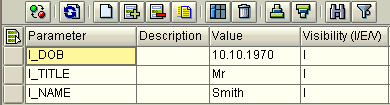
Result
You have created import parameters and assigned them default values. Each time the script is executed, the defaults will be used unless other values are supplied.