 Preview


Preview
Features
In the preview you can (de)activate the lines of a box in two ways:
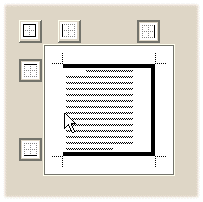
Presentation and Output
The right box border of a text node matches the right window border of the window in which the text is displayed. To move this border to the right, enter positive values; to move it to the left, enter negative values. For capacity reasons the preview always displays the box in the same size. This implies that if you increase the spacing, the display in the preview decreases. However, the output of the node contents always remains the same, independent of the box settings.