1.3 Technology Block Diagram 
NWBC can be broken down into effectively a shell and a canvas area. In addition, it is possible to have a number of open windows, each with its own canvas. The shell itself has the main goal to enable the navigation through business processes based on the roles assigned to the user. It is possible to load these roles from either an ABAP role repository (PFCG) or a portal role repository (PCD) via a set of web services. Once the roles are loaded, they are presented to the user in a top level navigation area (for the first hierarchy level) and a detailed navigation area on the left. Furthermore, the shell imbeds one canvas that is typically used for overview type of applications.
Additionally, the shell can open any number of application windows. Each of these windows encompasses a canvas as well, typically used to run a specific transaction as part of a business process. (NWBC v3.0, as opposed to NWBC v1.0, supports a more modern multi-window paradigm, allowing a number of applications to be run side by side.)
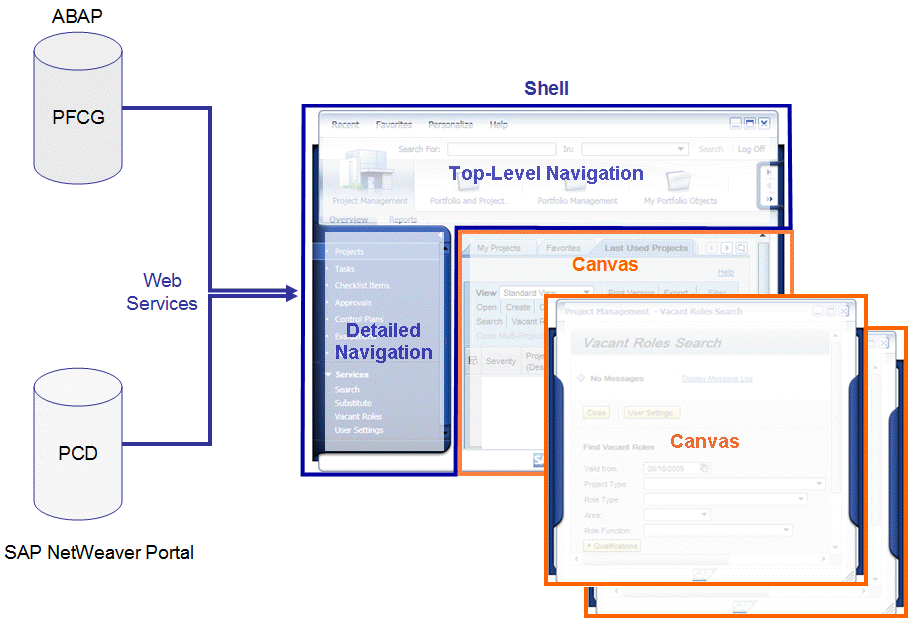 (Technology overview diagram)
The canvas can display applications that are based on different types of technology, according to the required business process. For the end user, the canvas is the main area where they can see the actual work that needs to be done.
Type of Canvas |
Type of Communication |
|---|---|
SAP GUI SAP GUI for HTML |
DYNP/DIAG |
Web Dynpro (HTML) |
HTML/HTTP |
Web Dynpro |
HTTP |
Microsoft Internet Explorer (Browser) |
HTML/HTTP |
With this approach, NWBC as shell harmonizes the different application technologies by reconciling various canvas types. Thus NWBC weaves a net between SAP’s SAP GUI heritage to a more newer world based on Web Dynpro.