
 Monitoring SAP NetWeaver

Use this scenario variant to monitor your SAP NetWeaver system landscape. For effective monitoring with as low a TCO as possible, we recommend that you use a central monitoring system, from which you can monitor your entire system landscape on the basis of the CCMS monitoring infrastructure.
Architecture of the Scenario Variant
The monitoring infrastructure offers the following advantages, irrespective of the display tool for the monitoring data:
● For nodes in which monitoring data is reported, there are rules for the generation of alerts, for example, if particular messages occur, or if defined threshold values are exceeded. An alert therefore represents a problem message that an associated workflow can trigger.
● You can assign methods to nodes. These include analysis methods, which call an appropriate special transaction from the display tool. You can use this transaction to analyze and solve possible problems or error situations. Auto-reaction methods, which are automatically executed in the case of an alert, are also available. You can, for example, inform the responsible employee about this alert by e-mail or SMS in this way.
● The monitoring infrastructure offers a flexible framework into which extensive monitoring and administration functions can easily be added. Certifiable interfaces allow both the transfer of other monitoring data into the monitoring infrastructure and also the export of the monitoring data for additional external processing. The elements of the monitoring infrastructure function largely independently of each other and can be further developed and adjusted independently of each other.
● You only need to maintain configuration settings once in the landscape, in the central monitoring system.
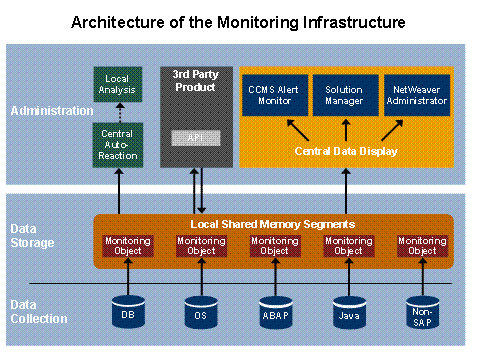
There are two powerful options available to centrally display the monitoring data:
● System Monitoring Work Center in SAP Solution Manager
As of SAP
Solution Manager 7.0 SP 15, the
 Work Center is
available to you as a central work environment with access to role-specific
functions. You have access to relevant messages, alerts, analyses, and
documents for which you have access through your role.
Work Center is
available to you as a central work environment with access to role-specific
functions. You have access to relevant messages, alerts, analyses, and
documents for which you have access through your role.
One of the
Work Centers,
System Monitoring,
is a central point of entry for access to all necessary functions for
monitoring the status of your systems.
The monitoring covers all technical components that you require to operate your business processes. It also provides you with the Key Performance Indicators (KPIs) for the areas of availability, stability, throughput, and security.
On the basis of this monitoring data, Web Reports are available to you, which relate to Service Level, capacity developments, or the quality of the solutions. In this way, you can centrally evaluate the availability of the entire system landscape.
The following functions are available:
○ In the Alert Inbox, you can display and process alerts from the monitoring infrastructure.
○ In proactive Monitoring, you can check the status of your systems before alerts are generated.
○ You can use Connectivity Monitoring to monitor RFC connections.
○ Job Monitoring provides a list of background jobs with detailed information.
○
You can perform
various analyses, including
EarlyWatch Alerts,
IT Performance
Reporting,
Service Level
Reporting, and
Evaluation of System
Availability
● Alert Monitor
Use the Alert Monitor (transaction RZ20) as the central ABAP tool for monitoring your entire system landscape.
In addition to the complete display of all monitoring data, the Alert Monitor provides all options for the central Customizing of the monitoring of your system landscape, such as maintaining the threshold values and assigning auto-reaction methods.
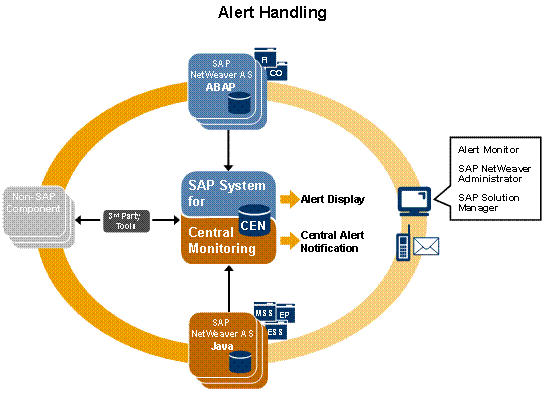
Required or Optional Installable Units
To use this scenario variant you require the following installable units:
System with activated usage types:
● Application Server ABAP
IT Processes of the Scenario Variant
This scenario variant comprises the following IT processes:
Process |
What You Should Know… |
The monitoring data is collected locally (in the monitored component itself) or centrally (in the central monitoring system) in this IT process. |
|
In this IT process, the responsible people are automatically informed about the relevant problem if an alert occurs. |
|
In this IT process, the responsible administrator determines and solves the cause of a problem. |
|
In this IT process, the troubleshooting is completed by adjusting the documentation or forwarding the problem to SAP. |
More Information
For detailed information about setting up central monitoring, refer to the Monitoring Setup Guide – SAP NetWeaver 7.0 at service.sap.com/OperationsNW70.