 Time Lag
Time Lag
Use
You use this function to map time spans between two business activities that are related to each other as regards content. Frequently, the delayed activity is not concluded instantly after the period of the delay, rather it drags on over an unanticipated period of time. For example, with this function, you can take into account that the receivable due from a customer, that results from sales made, only leads to a delayed incoming payment, that increases the amount of cash. In this way, you can portray the date of required payments, typical payment history for regions or individual customers and other activities that span a period of time. In many cases, planning time lag enables you to plan more realistically (and therefore more precisely) than would be possible under the assumption of ideal (but unrealistic) conditions.
Prerequisites
The functions for forward distribution are based on the
account model. In order to use them, the planning level must contain a characteristic for the accounts or posting items as well as one for the time base. The generic entry "key figure name" is intended for the definition of conditions in the parameter groups. The system makes sure that this entry is contained in the list of fields for conditions.Features
With the time lag function you can select from among three different function types, which differentiate slightly from each other. The following description of the functional scope refers to the function type forward distribution; the other types are presented afterwards.
Forward Distribution
When creating a time lag function, you first select a characteristic for the time base. The following time characteristics are supported: calendar day, calendar month, quarter, calendar year, calendar year/week, calendar year/month, calendar year/quarter, posting period, fiscal year/period, fiscal year and weekday. In addition, you define the characteristic, which you want to use to enter the source and target account for reposting of the amounts to be distributed.
With the indicator Reverse signs, you can determine whether the amounts to be distributed should be inverted additionally during reposting from the source to the target account. This function is useful to achieve an automatic balance adjustment between balance sheet items during reposting.
In addition to that you can select condition fields. The system automatically makes sure that the generic entry "key figure name" is selected as a condition field.
With the help of the Data records only from package indicator, you can determine whether data, which borders on the values selected in the package but is not contained in the selection itself, should also be taken into account for the distribution. The following graphic illustrates the way the indicator works:
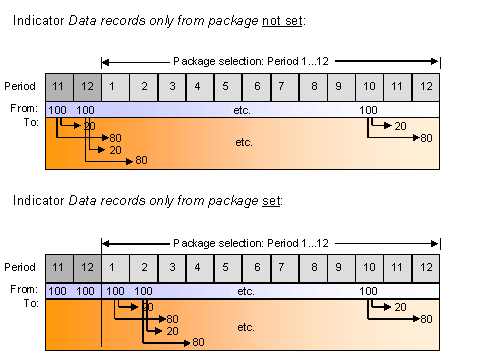
The graphic illustrates the following scenario: The periods 1 to 12 are contained in the package. In each period there is an amount of 100 to be distributed. You have defined a two-step offset for the distribution in the parameter group, which reposts 20% of the amount to be distributed to the subsequent period (and the corresponding receiver account) and the remaining 80% to the period after it. Setting the indicator Data records only from package has the following effect:
In the parameter groups for the planning functions, you create the characteristic values as selections for breaking down the time lags. This is done for every key figure that you wish to plan with the function (for example, for the key figure sales the values "America" and "EMEA", and "Asia" for the characteristic region). For every combination of key figure and characteristic, you then enter, on a percentage basis, the distribution of the key figure values per time frame in the detail area.
As the time frame for distribution, you enter a whole number that reflects the time spans between the triggering activity and the one following it. The actual time span results from the scaling of the chosen time characteristic: For the characteristic fiscal year, the value 1 corresponds to a year, for the characteristic period on the other hand it corresponds to a month.
Example: Time Lag According to Regions
|
Key figure |
Region |
Period/ delay |
Percent |
From account |
To account |
|
Sales |
America |
1 |
10 |
800000 |
142000 |
|
2 |
30 |
800000 |
142000 |
||
|
3 |
60 |
800000 |
142000 |
||
|
Sales |
EMEA |
0 |
20 |
800000 |
142000 |
|
1 |
50 |
800000 |
142000 |
||
|
2 |
30 |
800000 |
142000 |
||
|
Sales |
Asia |
1 |
40 |
800000 |
142000 |
|
2 |
40 |
800000 |
142000 |
||
|
3 |
15 |
800000 |
142000 |
||
|
4 |
5 |
800000 |
142000 |
In this example, the postings belonging to the sales in the regions America and EMEA are distributed over three periods, though in America the largest part of the incoming payments are first posted in the third period after the triggering activity. However, in the EMEA region, the largest part of the incoming payments are posted in the first period. In addition, in EMEA, the first payments go into the same period in which the sales were made (period 0), whereas in the other regions nothing is posted in this period. In the region Asia, the major part of the payments does indeed go into the first two periods, however, late arrivals must also be reckoned with in the fourth period. In all cases, the account 142000 for foreign receivables is posted to from the sales revenue account 800000.

Note that the combinations of key figures and characteristic values are unique, this means that no overlaps may occur in characteristic values for a key figure. Otherwise correct distribution of the key figure values cannot take place.
The total percentage rates that you enter per combination of key figure and characteristic must always result in 100%.

For performance reasons, it is recommendable to restrict the permitted value ranges of the time characteristic in the planning package, though if possible, it should be staggered according to the calendar (thus, for example, no use of special periods for the entry of periods). The time characteristic value of a record to be posted, increased by the offset, must be within this value range. If parameters set by you, have the effect that a data record would have to be posted in a period outside this value range, this data record is not posted.
When executing the function with a group of parameters configured in this way, the system generates as many other data records for every data record of the specified outgoing account, as products of the characteristic value and the assigned time lags. The account contained in these records is the offsetting account that you have entered. In addition, in all new data records, the key figure value from the original data record is weighted with the respective distribution factor.
Backward Distribution
Backward distribution corresponds to forward distribution, but reverses the time sequence of the activities to be planned. This means the planned activity to be generated does not take place later, but earlier than primarily planned. An example of this is the period-related planning of costs dependent on sales in
period accounting. This function can also be used in the context of simple production planning.Period Mapping
In period mapping, the time characteristic is restricted to the posting period. Key figures for the account characteristic are posted to another account with a period entered in the parameter group. In Customizing, the from periods are assigned to the to periods. Generally this mapping takes place so that values from different from periods are aggregated to a selection of to periods. For example, this enables the planning of quarterly payments on the basis of monthly planned costs. The following table makes this case clearer:
Example: Quarterly-Based Planning on the Basis of Monthly Planned Postings
|
From account |
Period |
To account |
Period |
|
800000 |
001.2000 |
142000 |
003.2000 |
|
800000 |
002.2000 |
142000 |
003.2000 |
|
800000 |
003.2000 |
142000 |
003.2000 |
The value range of the posting period must not be restricted further in the planning package. The period pairs, which you enter here, are not checked. Therefore, you must decide yourself whether a parameter group generates useful postings (for example, you could post values from the same from period into as many to periods as you want, this would normally not appear to be useful; however, this can be desired for special purposes, for example, simulations).