8 Performance Aspects 
To understand the performance profile for NWBC, one needs to take a look at the architecture first:
At startup NWBC runs the log in procedure and authenticates the user at the backend (depicted in green).
The shell reads role-related information from the PFCG store to provide navigation means between different SAP applications (depicted in blue).
The user interface(s) of each of these applications is embedded in a canvas running inside NWBC. These canvasses are reading and writing application data (depicted in orange).
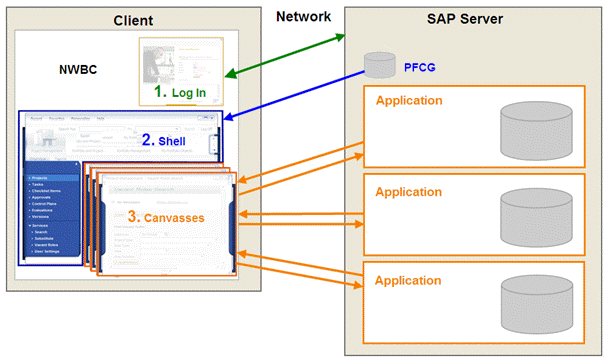 (architecture)
 Caution
NWBC does not change the performance behavior of the contained applications. The shell adds some additional performance on top but this happens in a constant way and does not relate to the performance behavior of the application. The application footprint is the same as if it was running in a stand-alone scenario.
This chapter will look at different performance aspects of NWBC:
8.1 Performance Analysis: Explains performance aspects of NWBC and the influence that NWBC could have on the backend performance.
8.2 Measuring Performance: Describes different tools which can help you with performance measurements.