 Personnel Planning
Personnel Planning
Purpose
With the planning application "personnel planning" you execute a combined planning of the number of employees (
headcount) and the costs resulting from this at aggregated level. Here you evaluate the relevant jobs with the personnel costs incurred and multiply the resulting amount by the number of positions in your area of responsibility.The delivered Customizing offers the possibility of integration with the operative Personnel Cost Planning (PA-CM-CP) in the R/3 System. If you already use PA-CM-CP in your company, then you can use various additional functions of the planning application, in particular the derivation, combination generation and verification of characteristic values in the area of the HR organizational structure.
But you can also use the planning application if you do not use PA-CM-CP but, for example, use Personnel Administration (PA-PA). In this case certain adjustments are necessary. A possible scenario could be that you use the operative Personnel Cost Planning for data entry, and use the data extracted in SAP BW as reference data for simulations in personnel planning.
The following graphic shows the integration of operative Personnel Cost Planning with the planning application "personnel planning":
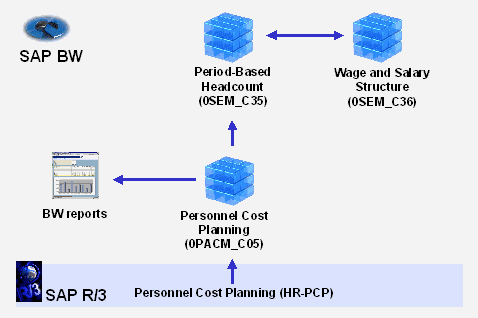
In the integration scenario displayed, you can transfer both the monthly determined personnel costs as well as the headcount it is based on (in full-time equivalents – FTE – or alternatively as the number of employees) from the transaction R/3 System into the InfoCubes of planning. First the monthly values are transferred and aggregated: The system forms the total both of the FTE as well as the costs using the individual employees and positions for all jobs of an organizational unit.
The planning level can also be selected differently by changing the Customizing. Dependent on the settings in the R/3 System, you can also calculate the personnel costs on the basis of a simulated payroll, this means on the basis of the actual wage and salary structures. After summarization of the monthly values, the average personnel costs are formed by dividing the monthly costs by the FTE, therefore, for example, the average basic salary of a sales employee or the average commission of a junior consultant (in percentage of sales).
In addition to the values from Personnel Cost Planning, information is also available from Organizational Management. The following graphic shows the different system objects that play a role here:
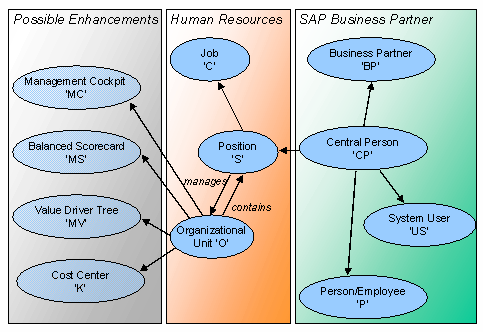
On the basis of the user ID with which you are logged onto the system, the system can determine the organizational unit for which you are responsible and for which you want to plan. As a result, the system determines the type and number of relevant positions for this unit.
With the help of delivered function modules, the system can determine the relevant organizational unit for the users currently logged onto the system, so that the persons responsible for the line in the planning process are only proposed the organizational units for planning which they themselves manage.
The system can also propose the valid combinations of characteristic values for organizational unit, job, position, and employee in manual planning on the basis of master data in Organizational Management or check entries appropriately.
Thus, reference data for planning at aggregated level is available from the operative planning of the R/3 System. Now basic figures such as the number of employees or the average values for the wage and salary elements can be changed, and the effects on the personnel costs calculated.
The time period for planning is period-specific so that you can portray the monthly acquisitions and divestitures in the headcount and changes in the cost items. Different from in operative Human Resources Management, for which a day-specific or even a finer time period is indispensable, the division according to periods is normally sufficient for the purposes of planning.
Prerequisites
Normally, personnel planning gathers the necessary master and transaction data from the InfoCubes of Human Resources Management. If this information in your company was not previously extracted into SAP BW, then the following prerequisites apply for the execution of personnel planning:
 0ORGUNIT) and personnel cost plan (
0CP_PLAN) as the global setting. If the data for the organizational structure of your company, which is maintained in Organizational Management, was not yet transferred into the SEM System, you must assign a fixed value for the variables of the organizational unit.
0ORGUNIT) and personnel cost plan (
0CP_PLAN) as the global setting. If the data for the organizational structure of your company, which is maintained in Organizational Management, was not yet transferred into the SEM System, you must assign a fixed value for the variables of the organizational unit.
To execute planning on the basis of reference data from earlier time periods, the Human Resources Management data required for this must have been extracted from the transaction system into SAP BW.
Process Flow
You begin personnel planning with the determination of the headcount, broken down by jobs and periods. Here you can transfer the full-time equivalents entered in Human Resources Management as reference data and then alter your planning correspondingly. Which jobs are offered for planning, complies with the current data which is maintained for the organizational unit for which you are planning.
For a job in the Human Resources department, the system determines which cost items are assigned to a job (for example, different salary elements, social insurance contributions to be paid by the employer and broken down by countries and periods) using an automatic derivation. You can also adjust this assignment if necessary.
When determining the valuation records, the system calculates the personnel costs per job, here the different cost items are taken into account which are assigned to the different jobs. In particular, the often complicated inner connection of cost items of a job are portrayed by a multilevel key figure scheme, in order, for example, to differentiate salary elements liable to social insurance contributions from those not liable to social insurance contributions.
In the last step, you execute the actual calculation of personnel costs. Here the system takes all entries into account which you made when executing the planning application, for example, headcount, cost items of jobs, social insurance contributions.
Result
You have detailed values about the personnel costs which will probably be incurred in the planning time frame. You can prepare these values for reporting by aggregating the data in the desired way and setting up appropriate queries.