
 Web Service Administration Using the Visual
Administrator
Web Service Administration Using the Visual
Administrator

Use
The Visual Administrator tool enables you to:
· Publish a Web service as a business service in the UDDI
· Display a WSDL document of the Web service in the browser
· Call the Web Service Homepage
· Configure service metering settings for Web service clients
Integration
The Visual
Administrator is not integrated in the SAP NetWeaver Developer Studio. The
tool is called separately. For more information, refer to the Administration
Manual, section
 Web Services Container
Service Administration.
Web Services Container
Service Administration.
Prerequisites
Web services are displayed in the Visual Administrator after they have been deployed.
Activities
...
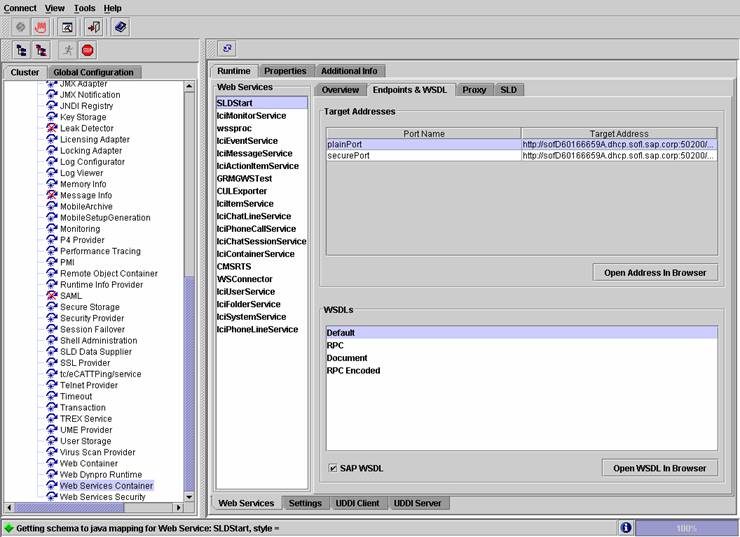
· Publish a Web service in the UDDI. Choose the Publish pushbutton in the Overview tab.
· Call the Web service homepage. Choose the pushbutton Open Address in the tab Endpoints & WSDL.
· Call the WSDL document belonging to the Web service. Choose the pushbutton Open WSDL in Browser in the tab Endpoints & WSDL.
·
Choose the
Proxy tab if you wish to generate a standalone proxy for the Web
service. More information:
Proxy
Configuration.
·
Configure the
service metering settings for Web service clients. Choose the Properties tab and modify the property values. More
information:
Configuring Service
Metering
See also:
Web Services Container
Service Administration
Publishing a Web Service as a Business Service