
 Connection Between Your SAP System and DB2 on
z/OS
Connection Between Your SAP System and DB2 on
z/OS

This section describes the connection process from your SAP system to DB2 on z/OS.
The way your SAP system is connected to your database server depends on whether you are in an ABAP or Java environment.

This section is not a procedure.
The following figure displays the users an groups used when you connect to your database instance on z/OS:

Database Connection in Detail
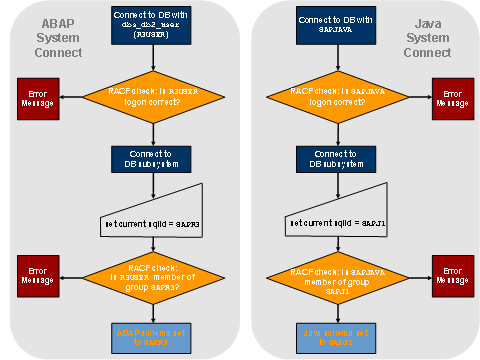
The following figure displays what occurs when you connect to the database:
ABAP Environment
dbs_db2_user, which is your DB Connect user, is specified when you install your database instance. dbs_db2_user is a member of the group dbs_db2_schema, which is the schema of the DB2 objects of the SAP system.
In this scenario, the environment variable dbs_db2_user is set to R3USER, and the dbs_db2_schema must be set to SAPR3.
When you log on to the database running on z/OS with R3USER, the following occurs:
● RACF checks if the R3USER logon was correct.
At this point, you are connected to the DB2 subsystem.
● The R3USER is connected to DB on z/OS and the following command is executed:
set current sqlid = SAPR3
● RACF checks if the user ID R3USER is a member of the group SAPR3.
If yes, the ABAP schema is set to SAPR3.
Java Environment
SAPJAVA, which is your DB Connect user, is specified when you install your database instance.It is defined in the JDBC Secure Store as:
jdbc/pool/<SID>/User=SAPJAVA
SAPJAVAis a member of the group SAPJ1, which is the schema of the DB2 objects of the SAP system.
SAPJ1 is defined in the JDBC Secure Store as:
jdbc/pool/<SID>/Url=<URL>;currentSQLID=SAPJ1
When you log on to the database running on z/OS with SAPJAVA, the following occurs:
● RACF checks if the SAPJAVA logon was correct.
At this point, you are connected to the DB2 subsystem.
● The SAPJAVA is connected to DB on z/OS and the following command is executed:
set current sqlid = SAPJ1
● RACF checks if the user ID SAPJAVA is a member of the group SAPJ1.
If yes, the Java schema is set to SAPJ1.