
 Mapping Characteristics to Elementary
Fields
Mapping Characteristics to Elementary
Fields

Purpose
To evaluate AFS-specific data in the BW system, you must map characteristics to elementary fields.
The following graphic illustrates this:

Process Flow
1. Call characteristics administration by choosing Logistics ® Central Functions ® Class System ® Master Data ® Characteristics Administration (transaction CT04).
2. Create the characteristics you want to use later (for example, color or size) in connection with a BW, APO, or CRM system.

○ Check if the following characteristics groups exist:
■ /AFS/SAP
■ /AFS/SAP-C
■ /AFS/SAP-D
○ If the characteristics groups do not exist, create them in SAP Customizing. To do this, choose Cross-Application Components ® Class System ® Characteristics ® Define Characteristics Groups.
■ In the Characteristics group field, specify whether you want the characteristic to be assigned later to a /AFS/SAP-D, /AFS/SAP-C or /AFS/SAP group.
■ In the Number of characters field, determine how may characters you want the characteristic to have. Make sure the characteristic has enough characters to be able to include the values from the corresponding /AFS/SAP-D, /AFS/SAP-C or /AFS/SAP group.
Under Define AFS Interface in Customizing, assign an elementary
field to each characteristic you require for reporting in the BW.

You must assign one elementary field to each
characteristic (1:1 relationship). You can use the
Position field to assign multiple
characteristics to an elementary field, however (1:n relationship). For
example, if you want the characteristics Width and Length to merge into one
elementary field, Size, you
can specify that the width should start at the first position of the
elementary field, and the length at the third position.
You can use one characteristic to define both requirement and stock category structures. This function is also used in mapping BW elementary fields. You can hence use one characteristic to map two elementary fields which represents stock and requirement category respectively.
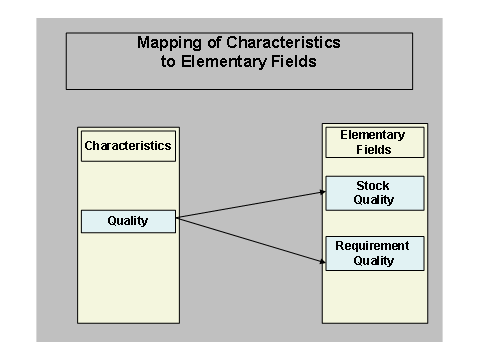
This kind of mapping is required in data sources where requirement and stock category information exists together and the values of requirement and stock categories are different. For example, the billing data source 2LIS_13_VDITM. This data structure has both stock and requirement category fields and both of them needs to be sent to BI. Since the characteristic used for stock and requirement category is same, the existing one-to-one (1:1) mapping of characteristic and elementary field works only if the values in stock and requirement category fields are same.
When the values are different in these two category fields, you can map category characteristic (Quality) to two elementary fields (Stock Quality and Requirement Quality). The values of stock and requirement categories are sent to BI through these two elementary fields.
You can also specify here that you want to assign a characteristic (such as color) a material master field (for example, color from the material master MARA-J3ACOL).

You must ensure that when you map characteristics to elementary fields, all the characteristics that you map to one single elementary field come either from /AFS/SAP-D, /AFS/SAP-C or /AFS/SAP groups only.
You can only map one material master field to one elementary field.
3. To activate the split module, you must set the basis switch BW.
You cannot undo the basis switch BW once it is set.
Activate the allocation of the characteristics to the elementary fields by incorporating include /AFS/PPBWRSAU01 in customer exit EXIT_SAPLRSAP_001 into the enhancement RSAP0001. The system automatically recognizes how the grid values and categories are to be allocated to the elementary fields.
For more information on activating the split, see note 502045.