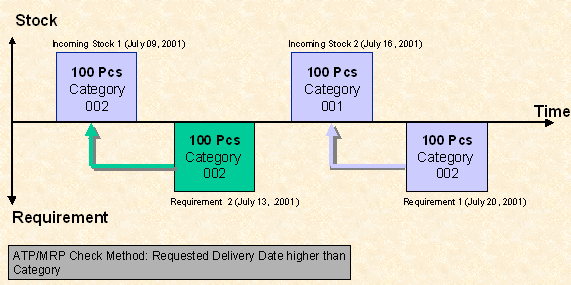
ATP/MRP Check Method


ATP/MRP Check Method
Use
Using the ATP/MRP check method, you decide whether the category or the customer's requested delivery date should have higher priority when covering a requirement. Depending on which method you choose, this can have different effects on the dates on which you can actually deliver the desired goods to your customer.
You can use the ATP/MRP check method in the material requirements planning as well as in the availability check.

You can control the ATP/MRP check method per ATP check rule in Customizing or in the AFS MRP 1 view. For the availability check the setting in the ATP check rule has priority over the setting in the material master.
If you want to use the ATP/MRP method in the availability check, make sure that your settings for the allocation run conform with the chosen ATP/MRP check method (for example, you should definitely have activated the category check for your allocation run logic).
Features
The ATP/MRP check method is especially important if you use AFS materials with coverage strategies in which it is permitted that more than one stock category be used to cover a specific requirements category.
You can use two different check methods for the MRP and/or availability check.
Category higher than Requested Delivery Date (Setting ' ')
Here, the system always tries to cover the requirement with the stock category that comes first in the stock/requirements assignment sequence defined for the coverage strategy. That means that the system checks the entire replenishment lead time and/or the entire ATP search horizon to see if the desired category is available. It will only check the other permitted categories if the result of this check is negative.

Requirement of 500 pieces in category 001. With the coverage strategy being used you control that a requirement in category 001 can initially be covered by stock in category 001, but after that it can also be covered by stock in category 002. If you use the ATP/MRP check method ' ' this requirement will be assigned the (incoming) stock in category 001 that is still available, regardless of whether or not the requirement can be confirmed for the requested delivery date.
Requested Delivery Date higher than Category (Setting 'C')
Here the system tries to cover the requirement for the requested delivery date, if possible. This means that the system checks all the available categories for a certain date before it proceeds to the next date within the replenishment lead time and/or ATP search horizon.
Requirement of 500 pieces in category 001. With the coverage strategy being used you control that a requirement in category 001 can initially be covered by stock in category 001, but after that it can also be covered by stock in category 002. If you use the ATP/MRP check method 'C' the system first checks to see if stock is even available for the requested delivery date (no matter which category). If so, it will assign the stock, regardless of whether the stock is in category 001 or 002.
Example
The coverage strategy being used has a permitted category field for quality. According to this coverage strategy, requirements category 002 should be covered by stock category 002 first. If this is not available a requirement in category 002 can also be covered by stock category 001.
Two purchase orders are planned with incoming stock, 100 pieces each, in categories 001 and 002. Requirement 1 for 100 pieces in category 002 has already been posted. The requirement date is later than the planned delivery dates for the incoming stock.
Requirement 2 for 100 pieces in category 002 is then posted. The requirement date of requirement 2 is between the planned delivery dates of incoming stock 1 and incoming stock 2.
Depending on the ATP/MRP check method which you have chosen in the availability check, requirement 2 will be confirmed in a different category and for a different delivery date.
Setting " " (Category higher than Requested Delivery Date)
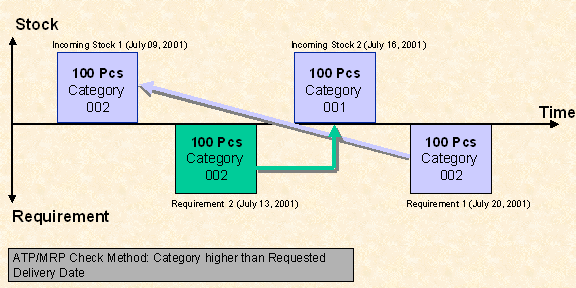
The system tries to confirm each requirement in the requested category. Requirement 1 (already in the system) will therefore be assigned to incoming stock 1 (July 09, 2001). Requirement 2 (to be rechecked) cannot be covered in the desired category 002. Since 002 can also be covered by 001, according to the coverage strategy, this requirement will be confirmed for incoming stock 2 on July 16, 2001. Therefore, the original requested delivery date of requirement 2 cannot be met.
Setting "C" (Requested Delivery Date higher than Category)
The system tries to confirm each requirement for the requested delivery date. It therefore assigns requirement 1 (already in the system) to the incoming stock with the closest date: incoming stock 2 (July 16, 2001). Since the requirement cannot, therefore, be covered in the requested category, this remains unconsidered in accordance with the chosen setting "C". Requirement 2 (to be rechecked) can now be covered by incoming stock 1 (July 09, 2001). That way both requirements are confirmed for the requested delivery date.