
 Course
Billing
Course
Billing

Use
The Billing Courses interface enables you to bill participation fees from Training Management to Sales and Distribution (SD). Data is transferred synchronously. No IDOCs are sent.
Integration
Functions in Training Management
· Transfer card data to SD system if you use payment cards for billing
· Authorize payment card if check is passed successfully
· Determine the participants to be billed for a course
· Transfer settlement data to the SD system
· Create a reference document for billing
· Compare document, i.e. check billing
· Report on completed billing
· Check whether billing has been canceled
· Cancel billing documents
· Create credit memos
· Cancel credit memos
Functions in Sales and Distribution
· Check card if payment cards are used in billing
· Check completeness of billing data transferred from Training Management
· Bill participation fees
· Transmit document information for document comparison with Training Management
Data flow
Payment card check:
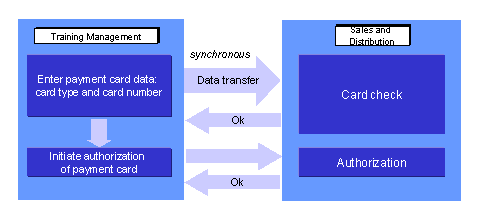
· When payment cards are used in the billing process, payment card data is stored in Training Management during fee assignment (function Book participation in the dialog Book/Payment Info. This data is transferred to Sales and Distribution, where a plausibility check is performed on the data. The result of this check is transferred to Training Management. This data transfer takes place using synchronous communication. If the check validates the card, the card can be authorized in Sales and Distribution.
Perform billing:
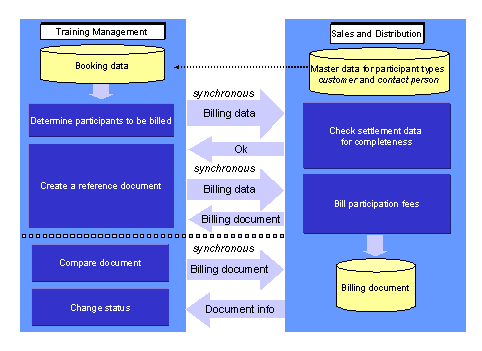
· In Training Management, the report RHFAKT00_LSO determines which participants are to be billed. The settlement data is transferred to Sales and Distribution where a completeness check is performed. This data transfer takes place using synchronous communication.
· In Training Management, if there is a positive check result, a reference document is created and the settlement data is transferred to Sales and Distribution via synchronous communication.
· In Sales and Distribution, billing is performed for the transferred participants.
· In Training Management, a document comparison is performed, whereby the billing document is transmitted to Sales and Distribution. Document information is sent back to Training Management from Sales and Distribution (via synchronous communication).
Cancel billing document:
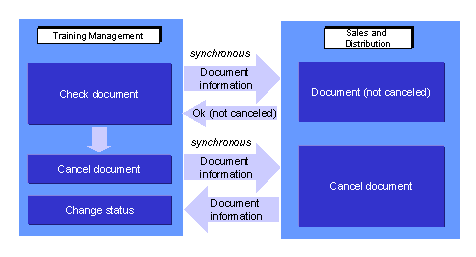
Prerequisites
- The sales organization data must be distributed, i.e. sales organization, distribution channel, and division.
- The customer distribution model must be maintained. When you are specifying the object method, you must define the HR system as the sending system and the SD system as the receiving system.
You must make the following entries in ALE Customizing, under Basis Components ® Application Link Enabling (ALE) ®Modeling and Implementing Business Processes ® Maintain Distribution Model and Distribute Views, and choose Maintain Method.
CLIENT: HR system
SERVER: SD system
OBJECT: PaymentCardServices
METHOD: Checknumber
OBJECT: ItCustBillingDoc
METHOD: CreateFromData
OBJECT: ItCustBillingDoc
METHOD: Simulate
OBJECT: ItCustBillingDoc
METHOD: IsCancelled
OBJECT: ItCustBillingDoc
METHOD: CancelFromData

It is planned to support the methods for object ItCustBillingDoc for one more release only.

For more information on the ALE business process Course Billing see the SAP Customizing Implementation Guide (IMG), under Basis Components ®Application Link Enabling (ALE) ®Modelling and Implementing Business Processes ®Predefined ALE Business Processes ® Human Resources ® HR <-> LO ® Set Business Event (Courses) Billing.
See also:
Business Process Flow of Billing Courses