
 Course Participant: Contact Person

Use
Data on contact persons, for example, customer employees that can be booked as participants in Training Management can also be administered in the SAP component Sales and Distribution (SD).
In this business process, data on contact persons is transferred from Logistics to the HR system via ALE. The transfer takes place synchronously via the RFC destination of Logistics. No IDocs are sent.
Integration
Functions in Training Management
· Create, display, and change contact person participant types by branching to Sales and Distribution.
· Prebook, book, cancel, rebook, and replace participants of the type contact persons.

Participants of type contact persons cannot access the Learning Portal. Therefore, participants of this type can only be booked for classroom training.
· Bill contact persons.
· Check existence of contact person.
Functions in Sales and Distribution
· Create, display, and change contact persons.
· Administer contact person master data.
Data flow
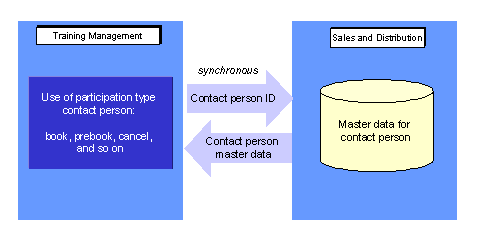
The data transfer takes place using synchronous communication. In Training Management, the interface program RHPART00 reads all existing segments of object BusPartnerEmployee with the BusinessPartnerEmployee.ExistenceCheck method in Sales and Distribution.
Prerequisites
When specifying the object method, you must define the HR system as the sending system and the Logistics system as the receiving system.
You must make the following entries in ALE Customizing, under Basis Components ® Application Link Enabling (ALE) ®Modeling and Implementing Business Processes ® Maintain Distribution Model and Distribute Views, and choose Maintain Method.
CLIENT: HR system
SERVER: Logistics system
OBJECT: BusPartnerEmployee
OBJECT TYPE: BUS1006001
METHOD: BusinessPartnerEmployee.ExistenceCheck

For more information on the ALE business process Course Participant: Contact Person, see the Implementation Guide (IMG), under Cross-Application Components ®Predefined ALE Business Processes ® Human Resources ® HR <-> LO ® Course Participant: Set Contact Persons.