
 Material Order in Training Management


The following applies to time-dependent courses.
Use
Materials are administered in the SAP component Materials Management (MM). These materials are booked as resources for courses in Training Management through the interface Materials as Resources in Training Management.
A reservation is created for in-stock material if it is available. A purchase requisition is created in Purchasing for non-stock material or material that is not currently available.
Integration
Functions in Training Management
· Select and reserve material for a course
· Determine the demand for a material for a course
· Transmit demand to Materials Management
· Create a reference number for material reservation and/or purchase requisition
· Order material (transfer material reservation or purchase requisition)
· Check material order
Functions in Materials Management
· Check availability of material
· Create material reservation and/or purchase requisition
· Transmit material purchase requisition to Purchasing
· Stage material
· Transmit reservation and/or purchase requisition number
Data flow
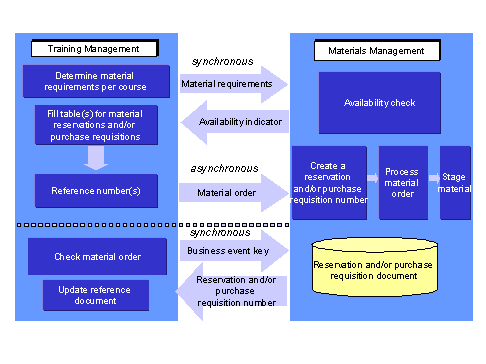
· In Training Management, the report RHMARP00_LSO is used to determine the material requirements of a course and transmit these to Materials Management. An availability check is carried out for the required material and an availability indicator is transmitted to Training Management. This data transfer takes place using synchronous communication.
· In Training Management, either a reservation or a purchase requisition is created depending on the availability indicator. This process generates either one or two reference numbers.
· The material data is transmitted to Materials Management via asynchronous communication. A reservation number and/or purchase requisition number is created there. The reservation and purchase requisition is further processed until the material is available.
· During material order checking (report RHMARP00_LSO), a check is carried out in Materials Management for the reservation or purchase requisition number using the course key and the reference number is returned to Training Management (using synchronous communication).
Prerequisites
· Release 4.5A or higher of both Training Management and Materials Management since the material order was not supported in previous releases.
· In distributed systems, the customer distribution model must be maintained. This means that the HR System must be defined as the sending system and Logistics as the receiving system during object method specification.
You must make the following entries in ALE Customizing, under Basis ® Application Link Enabling (ALE) ®Modeling and Implementing Business Processes ® Maintain Distribution Model and Distribute Views, and choose Maintain Method:
CLIENT: HR system
SERVER: Logistics system
OBJECT: Material
METHOD: GetList
OBJECT: MaterialReservation
METHOD: CreateFromData
OBJECT: Purchase Requisition
METHOD: CreateFrom Data
You can generate the partner profile from the distribution model. For more information, see the SAP Customizing Implementation Guide (IMG), under Basis Components ® Application Link Enabling (ALE) ® Modelling and Implementing Business Processes ® Partner Profiles and Time of Processing ® Generate Partner Profiles.

For more information on the ALE business process Activity Allocation in Training Management see the SAP Customizing Implementation Guide (IMG), under Basis ® Application Link Enabling (ALE) ® Modeling and Implementing Business Processes ® Predefined ALE Business Processes ® Human Resources ® HR <-> LO ® Set Up Material as Resource in Training and Event Management.
See also:
Business Process Flow of Material Order