Assignment Test

Use
The assignment test is a background process step that precedes invoice verification.
You use this function to ensure that the system only starts invoice verification if open goods receipts exist for an invoice.
Using the assignment test has the following advantages:
·
Even an
unsuccessful assignment test is quicker than a complete invoice check in the
background, as the system is required to process less data from the database
(for example, no article data is required) and perform fewer checks and
reports.
Moreover, instead of completely assigning open goods receipts, as in the
background process, the system performs only rudimentary assignment for
these.
· An error in a background check always requires a manual response, but this is only required for an assignment test if the assignment test period is exceeded.
Prerequisites
· To perform an assignment test, users must have authorization to make changes in all sites.
· To allow the system to carry out an assignment test, invoices must be related to one of the following reference types:
¡ Purchase order
¡ Delivery note
¡ Bill of lading
The system does not perform an assignment test for any other reference type (for example, service entry sheet or vendor); instead it releases the invoice for the background check after the waiting time defined in Customizing.
· The assignment test requires invoice verification to be performed in the background.

In online invoice verification, you enter, check and post invoices in one step. There is no need for an additional assignment test.
Features
The system uses the assignment test to check whether a goods receipt exists for an invoice that has already been entered, and only performs the relevant invoice verification in the background if a goods receipt does exist.
You can customize the assignment text so that all invoices that have been in the system for so long that it is safe to assume they contain errors (for example, invoice with a delivery note number that does not exist) are included in the background check. After the check has been completed, invoices that still contain errors must be processed manually by the invoice verification clerk.
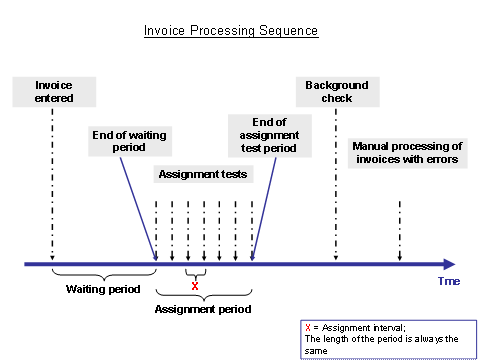
Invoices are not included in the assignment test immediately after they have been created but rather only after the waiting time that the system determines using the settings in Customizing. The first assignment test takes place after the waiting time expires. If a goods receipt was found during the assignment test, the invoice can then be checked in the background. If the system was unable to find a goods receipt that it could assign to an invoice, it repeats the assignment test after a waiting period defined in Customizing. In Customizing, you specify how often this assignment test is to be performed, based on your vendor settings. You can combine waiting periods into assignment groups and then assign one such group to each vendor.
If an
assignment test finds several invoices for one purchase order and a goods
receipt that has not been settled, the system flags all the invoices for this
purchase order with Goods Receipt Found.
The system can refer one goods receipt in the assignment test that has
not yet been settled to several invoices, as the assignment test does
not perform any reservation for the goods receipt.
Activities
The system performs the assignment test as follows:
Entering selection criteria and structuring the worklist
The system processes all open invoices as part of the assignment test if one of the following conditions is met:
· The assignment test date is either before or the same as the check date.
· The assignment test date is not available.
In the first instance, the system performs an assignment test for the invoice in question, in the second it determines the first assignment test date and the end of the waiting period.
The system specifies the first assignment test date when it saves the invoice. If you use the Hold function (transaction MIRA) rather than the Save function for an invoice, the system does not determine an assignment test date.
You can restrict the invoices to be processed by an assignment test (for example, to perform the report in parallel for performance reasons) by selecting only certain assignment criteria.
Calculating the first assignment date
For invoices that do not yet contain an assignment test date, the system must determine the end of the waiting period and, accordingly, an assignment test date. The assignment date is determined based on the assignment criteria in the invoice. In addition, the system uses the Customizing setting to determine the end of the assignment period.
You can use a BAdI to override the assignment date and the end of the assignment test period in a customer-specific manner.
Assignment Test
The system performs the assignment test for invoices for which the assignment test date corresponds to the check date (default value for the check date is the system date) or an earlier date.
Calculating the next assignment test date or end of the assignment test
If no goods receipt has been found by the assignment test for invoices with reference to a purchase order, delivery note or bill of lading, the system checks whether the date of the current assignment test is the same as or later than the end of the assignment test period in the invoice. In this case, the assignment test is finished and the invoice for the background check is released. Otherwise the system determines the next assignment test date.
The system uses the assignment test group for the current vendor saved in the vendor master to read the Length of Interval Between Two Assignment Tests. The system adds this period of time to the check date.
For all other reference types (for example, service entry sheet or vendor), the system releases the invoice for the background check.
Scheduling background check
The system plans invoices for the background check if one of the following cases arises:
· The system has identified a corresponding goods receipt.
· The end of the assignment test period has been reached.
· An error occurred, for example, the purchase order for the invoice was deleted.
Saving the changed data and issuing the results
After processing, the system updates the changed header data in the invoice:
· Invoice document status if the invoice for the background check has been released
· Filling the assignment test date with the newly determined date if no open goods receipt has been found for the invoice
The system also issues the following data:
· Number of invoices processed
· Number of invoices released for the background check
· Number of invoices not assigned successfully
The following figure shows the invoice processing timeline during which the system was unable to find a goods receipt for the invoice.