
 Nota Fiscal Integration into SD

Use
One of the primary features of Country Version Brazil is that it automatically generates a nota fiscal within the billing function of Sales and Distribution (SD).
Integration
The SD process is illustrated below, starting with the creation of a sales order and concluding with the generation of the required notas fiscais.
Nota Fiscal Integration into SD Billing
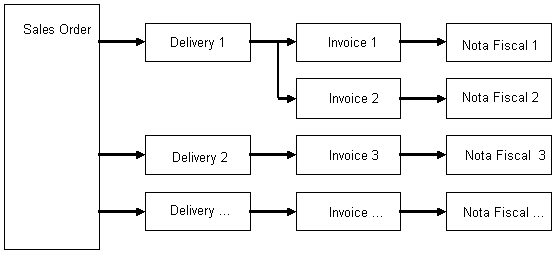
The system creates
a nota fiscal for each
 billing
document that is
generated, these being invoices in the above example. A nota fiscal is also
generated from several other SD business processes; these are described in the
following documentation.
billing
document that is
generated, these being invoices in the above example. A nota fiscal is also
generated from several other SD business processes; these are described in the
following documentation.
Once a nota fiscal is generated, you can view and print it using the Nota Fiscal Writer. You can also view the nota fiscal by branching directly to it from the billing document, by choosing the Accounting pushbutton; it either appears directly, or you choose the nota fiscal from the list of displayed accounting documents.
Prerequisites
Before the system can generate the notas fiscais automatically, you must complete a number of Customizing settings.