
 Sort Sequence for Dimension Values

Use
You can define any number of dimension values per dimension. The alphabetical sort order often does not correspond to the order in which the dimension values should appear. Therefore you can control the sort sequence to suit your requirements.
Features
The sorting order is defined by the order in which the characteristic values are created. For example, you have four characteristic values L, M, S and XL. You want the grid / applications to display the order as S, M, L and XL. You must then enter them exactly in this order during characteristic value creation.

Sort Sequence for Dimension Values – Line Entry
You have a two-dimensional grid with dimension color with the values white (WHT)and black (BLCK) and dimension size from the previous example. The sort sequence for the color values is BLCK, WHT. You have allowed all possible combinations as grid values.
In the line entry the system sorts the grid values as follows:
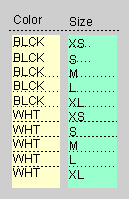
By changing the sort sequence in the master grid you can sort the grid values according to the second dimension, which in this example is size.
