
 Issue Remediation

Purpose
If an issue was discovered in a process, a control, or a management control, you need to document in MIC how this issue was resolved.
If an issue could be resolved quickly and easily, you only need to enter a comment for that issue. If issue remediation is ongoing or needs to be documented in greater detail, you create a remediation plan. When the same person is assigned as the processor of an issue and as the processor of the corresponding remediation plan, a simplified form of issue remediation occurs. This means that fewer tasks are sent because there is no need for information to be communicated between different processors.
Depending on the setting made in Customizing under Assessment and Test or during the acceptance of processes for an organizational unit, a remediation plan may be reviewed and validated by another person. Validation, however, is only possible as part of assessments.
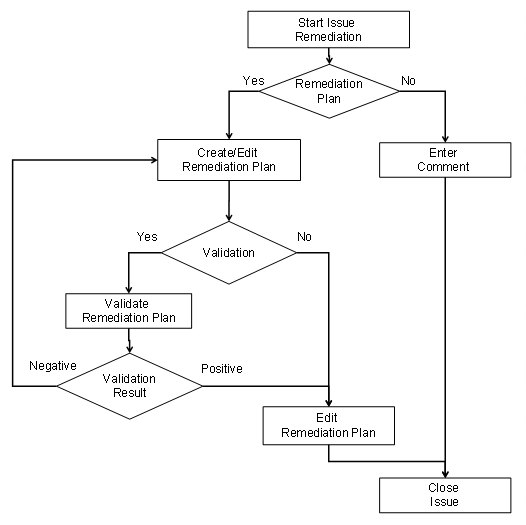
The following diagram shows the possible steps for issue remediation:
Prerequisites
An issue was created as part of an assessment or a test and has been assigned to a processor.
Process Flow
...
1. The task Start Issue Remediation appears in the worklist of the processor entered for the issue.
2. The processor decides whether issue remediation should involve a remediation plan:
Without remediation plan
a. The processor decides whether he wants to resolve the issue himself or assign it to another processor. In the latter case, he changes the entry under Processor.
b. The processor chooses Release for Processing and saves the issue.
c. The processor last entered receives the task Close Issue Without Remediation Plan in their task list.
d. The person with this task enters a comment describing issue remediation before choosing Complete.
With remediation plan
...
a. The issue processor creates a remediation plan, enters a processor for the remediation plan, and chooses Release for Processing.
b. How the process proceeds from here depends on whom the issue processor has entered as the processor of the remediation plan:
Himself/Herself (simplified issue remediation)
i. The issue processor receives the task Close Issue and Remediation Plan in his or her task list.
ii. With this task, the processor receives authorization to enter all remediation plan data, including the percentage of completion, and to set the remediation plan and the issue to complete. Validation becomes superfluous.
Another processor
...
i. Another processor receives the task Enter Details for Remediation Plan in his/her task list. This processor enters additional information and, where necessary, enters another processor.
ii. Where necessary, the remediation plan details are reviewed and validated.
iii. The processor last entered for the remediation plan receives the task Document Progress of Remediation Plan in his task list. With this task, he enters the percentage of completion in the system.
iv. Once the remediation plan has been fully implemented, the processor chooses Complete.
Result
The person who reported the issue must now reassess or retest the control, before confirming that the issue has actually been resolved.