
 Material Grids: Overview

Use
You use material grids to map each of your materials in all of its characteristic values in the system.
There are different grid types available in AFS:
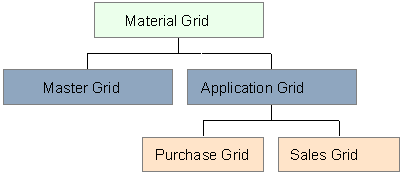
Prerequisites
You have defined characteristics by going to the SAP Easy Access screen for characteristics and choosing Cross-Application Components ® Classification System ® Master Data ® Characteristics (Transaction CT04) and assigned them characteristic values.
Features
Grid structure
You determine the structure of your grids in the AFS system using dimensions. A maximum of three dimensions is allowed of which the total length must not exceed eight characters. You form grid values using a combination of individual dimension values

For your material jeans which you carry in various colors, (waist) sizes, and lengths, you create a three-dimensional grid from the dimensions color, size, and length. In the header lines of your grid you enter the individual dimension values that are relevant for your material - color shades, individual sizes, and different lengths. By combining these dimension values, you enter the grid values of your material. A valid grid value of your jeans could in this case be RED3432.
Grids in the Application
Using the one time assignment of a master grid to a material, you specify the grid values in which this material can occur. This assignment applies as long as you carry your material.
The actual control of your material takes place via grids. You can thus maintain sales and purchasing related condition records, for example, using master grids and application grids. Using the application grids you can also specify which grid values you want to have in stock or sell in which season.
You specify the valid application grids for your material depending on the master grid for the material. In contrast to the master grid, you can replace the application grids of your material with other ones. Only grids that are based on the master grid of the material are permitted. You enter the reference between application grids and materials via grid control data.
Grid views
Grid values for AFS materials are entered, maintained, and processed in logistical processes such as MRP, sales order processing, and others using two views:
· In the line entry view the system lists the grid values vertically from top to bottom. You can determine which values are listed at the top by defining sorting sequences for the individual dimension values. For example, you use this view for the availability check.
· In the grid entry view, the system shows the grid values in the pattern, that is, how you have combined them in the grid maintenance. For example, you use this view to enter quantities in the sales order.
Activities
To create grids, go to the SAP Easy Access screen and choose AFS Central Functions ® Grids ®Material Grid ® Create
Follow the steps below:
1. Create grid dimensions.
2. Create a grid.
3. Assign the grid to the material master.