
 Partner Role Assignments

Use
You assign partner roles to a business location to:
· Identify the type of activity that an oil company business partner is involved in with respect to that location
· Support direct links to
¡ Customer master data
¡ Vendor master data
¡ SAP user data
· Generate links that are used by the standard SAP system reporting tools.
· Enable the maintenance of sales area data for customers in the business location master record. The system uses this data as default data for automatic billing of the customer.
When you assign a partner to a location, you define both a location partner role type and a start time. A partner role assignment is therefore the unique occurrence of a business partner undertaking a specific activity at a specific location, starting at a specific point in time.
For more information about business partner master data, see:
·
 Business Partner
Master Data Structure
Business Partner
Master Data Structure
Prerequisites
In Customizing for the Industry Solution Oil & Gas (Downstream) you must:
· Define partner roles by choosing SSR ® Business Location Master Data ® Business Partner Roles ® Define partner role.
· Define technical categories for partner roles by choosing SSR ® Business Location Master Data ® Business Partner Roles ® Define partner role - technical category
· Assign technical categories to partner roles by choosing SSR ® Business Location Master Data ® Business Partner Roles ® Assign technical categories to partner roles
See also:
Categorization of Business Partner Roles
Features
Multiple Assignments
As one business partner may perform a number of different location partner roles at a specific business location or the same role at a number of different locations or a combination of these, you can:
· Link one location to a number of business partners
· Link one business partner to a number of locations:
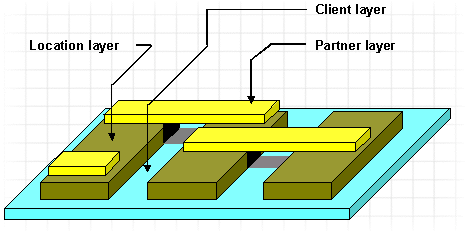

If a partner is the owner of several service stations, you can create a customer master record for a sold-to partner and within this record several ship-to partners. You can then link a different ship-to partner to each business location.
Partner Role Types
The location partner role type is used to classify the activity of a business partner with respect to the business location. It is a four-character code that is freely configurable.
In Customizing for the Industry Solution Oil & Gas (Downstream), you can adjust settings by choosing SSR ® Business Partner Roles ® Define partner role. Before it is available for use, the location partner role must be assigned to at least one partner role technical category. This defines whether the partner role relates to a vendor, a customer or a user maintained in the Oil & Gas System.
For more information about the partner role technical category, see Categorization of Business Partner Roles.
Status Checks and User Exits for Partner Role Assignments
The system reads the master data of assigned partner roles and checks for their basic validity when you:
· Display the Partner Role Listing screen for the first time from within any business location maintenance or display transaction
· Enter partner role data on the to Create Partner Role screen
· Change partner role data on the Change Partner Role screen
Once the check has been made, the appropriate status icon appears.
You can introduce additional checks for business partner objects by coding user exits and using the ABAP Workbench enhancement facility to activate these. If you wish to code additional checks for the object to which you are assigning the business location, you need to activate the relevant enhancement.
You can use the following enhancements:
· OIFA0401 for checks of customer business partners
· OIFA0402 for checks of vendor business partners
In both cases, the enhancement calls user processing during the initial load of the partner master data and during PAI (process after input) on the partner assignment input fields.
For more
information about the use of enhancements, see
Customer
Exits.
Links to Dialog Transactions
In Customizing for the Industry Solution Oil & Gas (Downstream) you can define the permissible range of dialog transactions to which links to a partner role are supported. You do this by choosingService Station Retailing (SSR) ® Business Partner Roles ® Define link dialogs for technical category.

No check is made to determine the suitability of a dialog transaction for a particular object. For example, it is possible to specify the display cost center transaction for the customer navigation link.
If no Customizing entry is made for the dialog control of a particular link object, the system calls a default dialog. Normally, this is the display master data dialog transaction for that partner role link. If one control entry is made for a particular link object, the system calls the specified dialog transaction. If multiple entries are made for a link object, the system calls a dialog box.
Overlapping Validity Periods
By enabling overlapping validity periods for partner role assignments, you make it possible to assign more than one partner role of the same type to a location for a specific time.
In Customizing for the Industry Solution Oil & Gas (Downstream), you can enable overlapping validity periods as follows:
· At the client level by choosing SSR (Service Station Retailing) ® Business Location Master Data ® Business Partner Roles ® Set system control - partner roles
· For each business location type/ partner role combination by choosing SSR (Service Station Retailing) ® Business Location Master Data ® Business Partner Roles ® Assign partner roles to business location type. You can only use the indicator for allowing overlapping validity periods at this level if it is not set at client level.
Overlapping validity periods can not be enabled for business location type/ partner role combinations for which SD document creation is enabled.
You can display overlapping partner role assignments. For more information, see Displaying Overlapping Validity Periods Listing.
See also:
Categorization of Business Partner Roles