
 Definitions of Platform-Independent File Names

The conversion of a platform-independent logical file name to a platform-specific file name and path is controlled by definitions that are stored in tables. These definitions refer to the following objects:
● Operating systems and Syntax groups
All operating systems used in a system configuration are assigned to syntax groups. A syntax group is the collective term for a set of operating systems with the same file and path name syntax. The definition of a syntax group specifies, for instance, how long file names may be, and whether file name extensions are permitted or not.
● Logical filename
A platform-independent descriptive name for a file to be stored in the system. It is cross-client, but can also be specified for one client.
● Physical file name
One physical file name is assigned to each logical file name.
● Logical path
A logical path is a meaningful, platform-independent name for a path under which files are to be saved. A logical file name usually has a logical path; only then can different physical paths be created for the logical file names, depending on the operating system platform.
● Physical path
Platform-specific physical paths are specified for one or more syntax groups for a logical path.
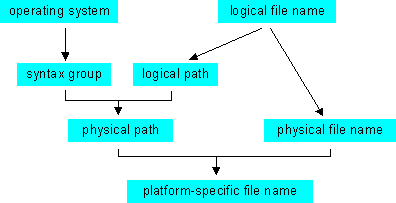
The following graphic shows the relationships between these objects, which convert a logical file name into a platform-specific one:
Parameters in physical file names and paths
Physical file names and paths can contain the following reserved words in angle brackets, which are replaced by the current value at run time:
Table: Reserved words
Reserved Word |
Replacement value |
<OPSYS> |
Operating system in function module parameter (see below) |
<INSTANCE> |
Application instance |
<SYSID> |
Application name in system field SY-SYSID. |
<DBSYS> |
Database system in system field SY-DBSYS |
<SAPRL> |
Release in system field SY-SAPRL |
<HOST> |
Host name in system field SY-HOST |
<CLIENT> |
Client in system field SY-MANDT |
<LANGUAGE> |
Logon language in system field SY-LANGU |
<DATE> |
Date in system field SY-DATUM |
<YEAR> |
Year in system field SY-DATUM, 4-character |
<SYEAR> |
Year in system field SY-DATUM, 2-character |
<MONTH> |
Month in system field SY-DATUM |
<DAY> |
Day in system field SY-DATUM |
<WEEKDAY> |
Day of the week in system field SY-FDAYW |
<TIME> |
Time in system field SY-UZEIT |
<STIME> |
Hour and minute in system field SY-UZEIT |
<HOUR> |
Hour in system field SY-UZEIT |
<MINUTE> |
Minutes in system field SY-UZEIT |
<SECOND> |
Seconds in system field SY-UZEIT |
<PARAM_1> |
External parameter 1 passed in function call |
<PARAM_2> |
External parameter 2 passed in function call |
<P=name> |
Value of a profile parameter in the current system |
<V=name> |
Value of a variable in the variable table |
<F=name> |
Return value of a function module |

All physical paths must contain the reserved word <FILENAME> as a place-holder for the physical file name.
Putting such parameters in physical file or path names supports differentiated but standardized file names. The parameter <TIME> can, for example, be useful, if a logical file is saved several times in a short time. The use of the system fields, and especially the last parameters listed, make naming flexible:
● <PARAM_1> and <PARAM_2> put values which are passed explicitly when the application program calls the function module FILE_GET_NAME, in file or path names.
● <P=name> includes the values of profile parameters in the current system. The report RSPARAM provides a list of profile parameters and their values.
● <V=name> includes the values of variables which were put in the control tables by the transaction FILE.
● <F=name> includes return values from function modules. The name of a function module used here must have the prefix “FILENAME_EXIT_”. The function module in the reserved word is only addressed with the part of its name after the prefix. For example, to use the function module, EXAMPLE, the place-holder would be <F= FILENAME_EXIT_EXAMPLE>. The function module must have the export parameter OUTPUT, for which no reference type is specified. Import parameters must have default values. Table parameters are not supported.