 Application Grids


Application Grids
Use
An application grid is always a segment from a master grid.
Using application grids you specify which of the grid values that you have permitted for your material in the master grid you want to purchase or sell.
Prerequisites
Before you can use control options in the application via purchase or sales and distribution grids, you must have maintained the grid determination for Purchasing and Sales and Distribution in Customizing and you must have entered the corresponding grid determination procedure in the material master.
Features
Maintenance
When you create an application grid, you must refer directly or indirectly to a master grid. In the latter case, you create the new application grid with reference to another application grid. The system copies all the grid values of the referenced application grid. It does not generate an interdependence between the two application grids, but assigns the new grid to the same master grid that is decisive for the referenced application grid.
Each application grid is either an identical copy of a master grid or a segment from a master grid. An application grid cannot contain more dimension values than the original master grid, nor can it be made up of entirely different dimensions than the master grid. Grid values not permitted in the master grid are also excluded from the application grid.
Application grid as segment of a master grid
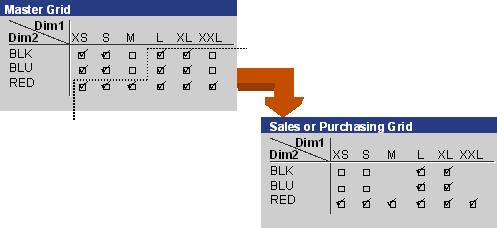
Changes in the master grid also affect all application grids that refer to the master grid

You decide to create your material with the master grid displayed in the above graphic and include gray as well. You add the color gray to the master grid as an additional dimension value and enter additional grid values. The system automatically updates all dependent application grids, but does not transfer the new combinations of grid values. You can decide in which application grids you want to permit the new grid values.
Application
Application grids allow you to coordinate and plan the purchasing and sale of materials.
You want to wait to sell your material until you have purchased sufficient stock. You do this by assigning the material a purchasing grid whose validity corresponds to the time period that you have planned for the purchasing. You also enter a sales grid for this material and make it valid for the time period during which you want to sell the material.
The validity periods of the two grids can overlap in this case. If you want a material to be discontinued, for example, you can extend the validity of the sales grid over that of the purchase grid. You thus ensure that the remaining stock continues to be available for sale, but that purchasing does not replenish the material.
The connection between material and application grids is variable, unlike the master grid, which is a fixed component of the basic data of your AFS material and which you must enter when you create an AFS material in order to be able to work with the material. You can assign sales or purchasing grids to a material, but you do not have to. You can also undo or change a connection any time.
You create a relationship between application grids and a material by using the
Condition Technique for Creating Grid Control Data. Here you specify the period for which you want a purchasing or sales grid to be valid for a certain material. You can also restrict the validity of the application grid according to criteria of your choice (for example, sales organization and sales area).You can also enter additional information for purchasing and sales.
You know that customer A never requests variants of size XS of your material Y with the master grid in the above graphic. For this case you can create a sales grid in which you exclude all the grid values combined with XS. Using the grid control data SD, you condition the sales grid within the relevant sales area for customer A and material Y. When creating an order for this customer, the system only offers you the grid values for material Y that you have permitted in the sales grid.
For more information, see
Condition Technique for Creating Grid Control Data.