Sort Sequence for Dimensions
Sort Sequence for Dimensions
Use
It is a fact that you use certain dimension values more often than others, and that is the same with entire grid values: Certain variants of material are sold more often than others.
With a combination from the sort sequence for dimension values you have entered in Customizing and a grid-based sort sequence for dimensions, you can immediately access grid values in the line entry view of the grid. That means you can directly access them without searching among the other values.
If the demand of certain grid values is different per season, you can change both sort sequences correspondingly.
Prerequisites
The entry of a sort sequence for dimension is only then successful, if
Features
The system creates complex line entry views out of many grid values. You need to find the most important and most popular variants of your material in the first lines for further processing.
In addition to the sort sequence for dimension values in the grid maintenance, you enter a sort sequence for dimensions by numbering the dimensions. Assign number 1 to the dimension that is the most important for your material and so on.
In the line entry view, the system correspondingly groups the grid values, by first displaying all combinations that exist for a value of the dimension you numbered with 1 in the sort sequence. As a sort sequence also exists for the individual dimension values, the grid values are displayed at the top of the line entry. These grid values are a combination of dimension values to which you assigned the lowest numbers in the sort sequence in Customizing.
By default the sort sequence is always Dim1, Dim2, Dim3. If you want to keep this sequence, it is sufficient to set the indicator sort dimension values.
The sort sequence for the dimensions of a master grid is not binding upon dependent application grids. You can at any time specify, deactivate or reactivate a sort sequence per grid.
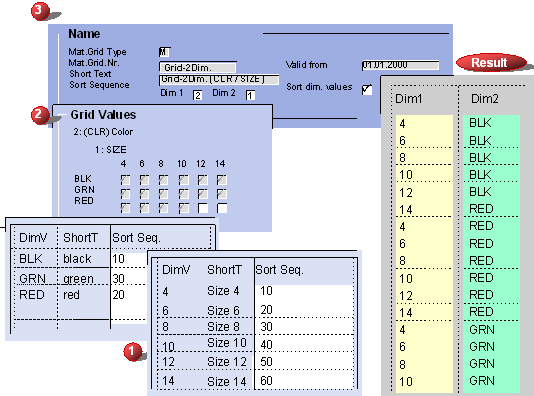
 Sort Sequence for Dimensions – Settings and Result
You create a grid for your material, consisting of the dimensions SIZE and CLR (color). In the line entry view, the grid values should be sorted by color.
In Customizing you define sort sequences for the dimension values of both dimensions (1). When creating the grid, you decide which dimension you use as Dim1 and which as Dim2 (in the example SIZE is Dim1 and CLR Dim2). Then you enter which grid values are permitted. (2). When creating or subsequently changing a grid you can set the requested sort sequence for dimensions by assigning number 1 to dimension CLR (Dim2). You activate the sorting of the dimension values by flagging the indicator sort dimension values. (3)
In the line entry, the system sorts the values corresponding to the entered sort sequences (result).