
 Working with Deliveries for Stock Transfers
Use
There are several procedures for transferring materials from one plant to another:
- Stock transfer posting from plant to plant in one step
- Stock transfer posting from plant to plant in two steps
- Stock transfer order without SD delivery
- Stock transfer order with SD delivery
- Stock transfer order with SD delivery and billing
If you want to use R/3 shipping functions when you process stock transfers, use the stock transfer order with SD delivery procedure for procedures within a company code and the stock transfer order with SD delivery and billing procedure for cross-company code stock transfers. The stock transfer order with SD delivery procedure has the added advantage that the shipping activities can also be processed with the R/3 system (picking, packing, printing the delivery note, and so on).
Features
A stock transfer using a stock transfer order as opposed to without an order has the following advantages:
- The receipt can be planned in the receiving plant
- You can enter a vendor (transport vendor) in the stock transfer order
- You can enter delivery costs in the stock transfer order
- The stock transfer order is linked to requirements planning: purchase requisitions that have been created in requirements planning can be converted to stock transfer orders
- Goods issue can be entered using an SD delivery
- Goods receipt can be posted directly to consumption
- The entire process can be traced using purchase order history
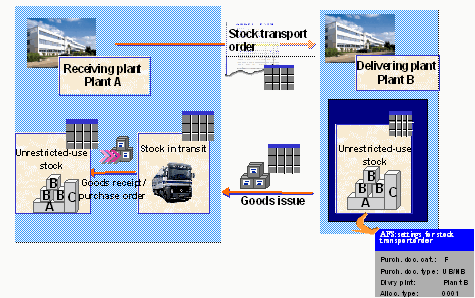
As far as the process flow is concerned, the process for AFS materials is the same as the standard process. However, special settings need to be made for AFS materials.
Activities
Prerequisites for goods issue in SD:
The following conditions must be fulfilled if you want to process goods issue using SD:
- A delivery type has been allocated to the purchasing document type in Customizing for Purchasing. If no delivery type has been entered for the document type, post the goods issue in inventory management.
- The customer number of the receiving plant has been maintained in Customizing for Purchasing.
- Shipping point determination has been maintained in Customizing for Sales and Distribution.
- Shipping data has been maintained in the material master record.
Special settings for AFS materials
In addition to the general settings, you should be aware of the following AFS specific points:
- Maintain AFS settings for stock transport orders: data must have been maintained for the delivering plant for purchasing document category F (purchase order). Depending on the document type and the delivering plant, an allocation run type (and mode) must be defined that run in the background when the delivery list is processed at a later date. If special stock is to be taken into account when stock is transferred, you can enter an appropriate allocation run type that uses this special stock.
- Item category determination in deliveries: when you are dealing with AFS materials you should make sure that an appropriate entry has been maintained for item category usage (CHSP batch split).