
 Season
Use
Seasons form an important aspect in the product life cycle for the apparel industry. The production of apparel is determined or varies qualitatively according to the season for which it is manufactured. An example of seasons would be summer, winter and others. The reason for such a demarcation of a year’s production schedule on the basis of seasonal requirement is understandable, as the demand of apparel is almost always seasonal. For instance, woolen garments are in demand only in winter. So, to ensure that the production lifecycles are aligned with the demand, we have the concept of seasons as an intrinsic framework of time on which the production schedule is based.
Features
This function offers the following options:
Relevance to Seasons
The relevance of a material to a season determines whether the material is planned for a season. Woolen fabric is an example of a seasonal material, which is relevant only for the winters and hence form a part of the production lifecycle for the winter season. But, there are some materials that experience a consistent demand throughout the year, for example vests, and hence are produced normally without being categorized as a material that is relevant for a particular season.
Determination of Seasons
...
There is no fixed method by which a year’s schedule is demarcated into a number of seasons. You can determine the relevant seasons depending on the kind of materials produced, the customer’s discretion and the demand cycles. There can also be a scenario wherein two seasons overlap. For example, there can be an event like, football season, which creates the demand for apparel associated with the event. You can define this as a different season altogether and have specific merchandise associated with it. Also, this football season can overlap over one or more already existing seasons.
Further Classification
In the fashion industry, a season can have collections associated to it and collections can in turn have themes associated with them. The presence of these features help in further classification of the offering for a season apart from providing a concept for each category of product offering.
The concept of seasons, in SAP AFS, is seamlessly integrated with the processes of sales and distribution.
You can use the SAP AFS Customization to create relevant seasons and the corresponding collections and themes beneath it. These three characteristics are arranged hierarchically as shown in the diagram below and are the basis for creation of any season, collection or theme:
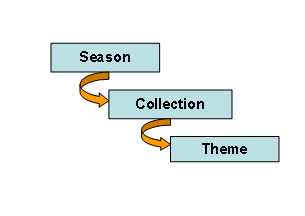

There is the dependency of an entity in the hierarchy to the one above it. For example, a collection has to be associated to a season and, likewise, a theme has to be associated to a collection. Hence, a collection or a theme cannot be defined as a stand-alone entity in the hierarchy mentioned above. A season on the other hand exists without any dependencies.
You create these entities to define time frame as the elementary attribute, which indicates its applicability in a year. You can also see the hierarchy through the user menu and can define the period at any of the three levels shown above. A period, as shown below defines the time frame within which that particular entity (season, collection and theme) is valid.

Activities
Season Processing
You must perform the following activities during the season processing:
1. Create new Season Indicator: You must create new seasons that are used in the season processing by choosing the following Customizing path Logistics General ® Define AFS Seasons. A season can be subdivided into collections and collections can be subdivided into themes.
2. Assign the Season to the AFS Material: You must assign the season indicator created above to the AFS material in the AFS basic data view to enable the execution of the AFS season processing. The season can be valid for the entire AFS material or only for the selected SKU data of the material. You can assign several seasons to an AFS material.
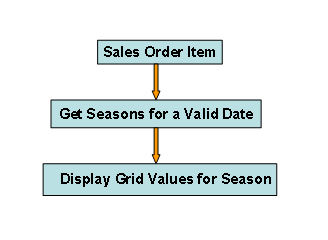
Each value of the SKU is associated with a season. This ensures that when sales orders are getting created for a date it would find the season that is relevant for the date and display only those grid values that are defined for that season, as shown below:
3. Season Table – Create Time Periods: You can create a season at different levels (sales organization, country, region, customer group, and customer). You can assign an order window while creating a season. It is specified in which period incoming orders are taken into account and which period is designated for delivery.
Seasons in the Order Processing
You can determine seasons at the item or schedule line level depending on the Customizing maintained at the order type level. You can maintain the following entries in Customizing:
Entries |
Activity |
Space/blank |
Season processing or delivery program processing |
L |
Determination and check of the season at item level and check at schedule line level |
P |
Determination and check of the season at item level |
E |
Determination and check of the season at schedule line level |
If you have maintained the season processing at the schedule line level E, only the season’s field is displayed on the screen. The collection and theme cannot be viewed at schedule line level.
During order processing, the system checks the validity of the season for an AFS material or uses the season to determine a delivery date. If a sales order does not correspond to the defined seasonal order and delivery window, a corresponding warning or error message will be displayed.
You can also perform the following activities in sales order processing:
● You can copy or re-determine the season (see Copying of Documents), if you enter a sales document with reference to a preceding document. For example, if you have selected the Copy Season Data indicator in the copy control in Customizing, then the season will not be re-determined but whatever season is maintained in the preceding document will get copied.
● If you do not select the Copy Season Data indicator in Customizing, then the document that gets created with reference to a preceding document will have new season determination irrespective of whether the preceding document has seasons or not.
● You can carry out the season determination during the order creation via Sales Document ® New Season Determination.