 Entering a Stock Transfer in the One-Step Procedure

Entering a Stock Transfer in the One-Step Procedure
Use
If you transfer a material in the one-step procedure, enter the stock transfer in a transaction. The goods receipt is entered in the receiving organizational unit with the goods issue in the issuing organizational unit. Since no stock in transfer or stock in transit is created, you do not have the option of monitoring stock while it is in transit.
The one-step procedure is especially suited for the stock transfer of Stor.loc. to stor.loc. within a plant, since in this case materials are usually in transit for a long time. If you transfer materials from Stor.loc. to stor.loc. in the one-step procedure, you decrease the chosen stock type in the issuing storage location and increase the same stock type in the receiving storage location. Usually the system posts this without a value because the transferred material is usually valuated the same in the same plant and the stock does not change at plant level. Accounting documents are only generated if the material is valuated separately and the valuation type changes during the stock transfer.
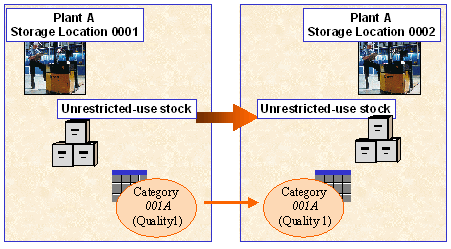

If you transfer materials in the one-step procedure, you have the option of planning the stock transfer by using a
 stock transfer reservation.
Procedure
For an overview of the AFS-specific functions for stock transfers, please refer to the documentation on
Processing Possibilities at SKU Level. To execute stock transfers between storage locations in the one-step procedure in the AFS system, take the following steps:
To transfer stock between storage locations that has already been assigned to a sales order by ARun, choose Alloc. Stock. You will see a list of all the allocated stock and you can individually specify the receiving storage location for each stock. Select the stock that you want to transfer and choose Line by line so that the entered data will be copied to the line view.