
 Release Check
Use
As there is often a long period of time between the order entry and the allocation, quantities that have been confirmed by the availability check during the order entry might have changed. When the confirmed delivery date is reached, there are often fewer goods available than had been confirmed. This material shortage is caused by underdeliveries and/or delayed deliveries.
You use release check rules to determine which quantities are acceptable for your customers. That means which minimum/maximum percent of the quantities must be fulfilled at the different release levels so that an order can be released for delivery.
Integration
You can define Release Rule for:
• Specific Temporary groups
• Specific customers
• Specific sales orders
• Allocation Run types (global release check rule)
You must define a Release Rule for each Allocation Run type. The system uses this Release Rule if there is no valid Release Rule for the temporary group or for the customer. If there are several valid Release Rules, the Release Rule of the group has the highest priority, that of the customer has the next highest and the Release Rule attached to the Allocation Run Type has the lowest priority.
To control the release check rule determination, maintain the determination logic parameters in each ARun type.
You can define the different release checks for different release check levels. The system uses a bottom-up strategy, which means that the check starts at the lowest level and then goes to the next higher level.
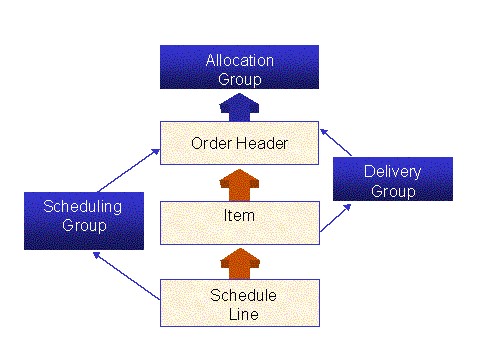
At the end of the release check rule, you must define how the allocated and still open (remaining) quantities should be handled. This final action is connected to the action rule and the reallocation rule (see Fill-Up).
Release checks can also be defined for value-added services and bills of materials. You can find the procedure in the IMG node Define Release Rules for Special SD Functions.
Example
The checks in the release check rule proceed as follows:

Since only 5 pairs of shoes of the 10 ordered pairs in size 38 are available (50%) and the release check rule is not fulfilled with a minimum quota of 60%, the 5 pairs of shoes are not allocated at schedule line level. The system then checks at item level whether a minimum quota of 70% can be reached. As in this case only the 10 pairs of shoes in size 36 can be passed on to the next release check level, the release check fails here as well. As a result, no pair of shoes can be passed on to the order header level. That means that the entire order cannot be allocated because the release check at header level fails as well (only 24 shoes are available, which is 48% of the total order quantity).
If the stock of the shoes in size 38 is increased by one pair, that means 6 pairs of shoes are available, the entire order can be allocated.
Excluding Allocations with Status D and F from the Release Check
With this function you can change the basis of the release check calculation and adapt it to the appropriate business process. To do this, use the calculation base parameter in the ARun type.
Special ARun Release Check Rules for Sales Orders
You can assign a specific release rule that is only valid for specific sales orders. The release check rule is then stored in the order header. The release check rules are determined or put into sequence using the determination logic in the ARun type.
The ARun release rule options are defined as follows:
Option |
Description |
1: Global release rule |
Checks all requirements selected by ARun with the same release check rule |
2: Customer-specific release rule |
Uses a separate release rule for each customer to check all sales order requirements for that customer |
3: Order-specific release rule |
Uses a special release rule to check requirements for an individual sales order |
The following are possibilities for setting up release rule determination:
Entry |
Release Check Rule / Release Check Sequence |
Blank |
Always use the global release check rule |
S |
1. Use the rule in the sales order 2. Use the global release check rule |
F |
1. Use the rule in customer master 2. Use the global release check rule |
X |
1. Use the rule in the sales order 2. Use the rule in customer master 3. Use the global release check rule |