 Sales Order Processing (Planned, Target and Actual Costs)

Sales Order Processing (Planned, Target and Actual Costs)
Use
In the R/3 System the actual costs of a production order can be monitored and compared with the planned costs of the order (target costs).
Features
The AFS System supports the cost object controlling for production orders using the entire logistical cycle; from the withdrawal of the components up to the settlement of the production order after completion. The valuation of the materials to be produced, is constantly carried out at SKU level (grid values/ category values).
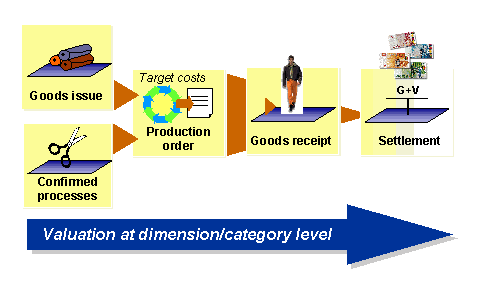
Sales order processing
The AFS system determines the planned and actual material and production costs of a production order as the standard system does.
Planned costs
The R/3 System calculates the planned costs of a production order with help of a costing that is based on the order lot size for the product to be produced. The costing is automatically created during the creation of a production order and saved for the order.
Within an an AFS order you can produce several stock keeping units of a product (order items). The different SKUs can have different planned costs because of their quantity structure. Therefore the system separately costs the order items and cumulates then the item planned costs determined.
The system calculates the plan credit of the order by multiplying the standard price of the produced product with the planned order quantity. The system considers the standard prices and quantities per order item.
Actual costs
In general, material costs, production costs and possibly overhead costs can incur for a production order. The system determines the belonging actual costs as follows:
If the production order is closed, a goods receipt is posted for the products produced. This goods receipt credits the production order with the standard price of the product that is multiplied by the actual quantity produced. Here the system also considers the standard prices and the quantities per order item.

You can display the planned and actual costs of a production order in the order master record by choosing Goto -> Costs.