Automated Action Handler
Purpose
You use the automated Action Handler during production. Typical areas are repetitive manufacturing and flow manufacturing, that is areas where recurring productionsteps require that the system carries out the same actions again and again (printing of documents, production tracking, backflushing, and so on).Production data of the production control system are transferred to planning, where they are processed further.
It is also possible to work with the automated Action Handler in shop floor production.
You can use the automated Action Handler both with iPPE (integrated Product and Process Engineering) and without iPPE.
Prerequisites
You have set up the connection between your production control system and SAP APO (see Connection of the Production Control System to SAP APO ).
You are using the standard Customizing settings or - if that is not enough - have entered the following information in the process step
Maintain Settings for Action Handler
(transaction /N/SAPAPO/AHC1):
actions , functions, parameters
You have entered the following information either in iPPE (transaction PPE) or, if you do not work with iPPE, in the master data of the Action Handler (transactions AHTGL02 and AHTGL01):
action points , including information on error handling
assignment of actions to action points with parameterization of the actions at the corresponding action point
Process Flow
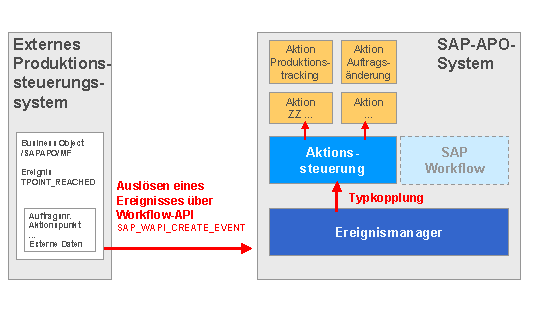
A planned order reaches an action point, where it triggers the event TPOINT_REACHED.
The production control system transfers the event data to the event manager in SAP APO, which then triggers the Action Handler.
The Action Handler in SAP APO checks which actions you have assigned to the action point and carries them out automatically.
The process is automatically repeated for all succeeding planned orders and for all further action points.