 Profile Maintenance
Use
You use this function to display, create, select, and process check profiles for the model consistency check.
Integration
All of the individual checks to be executed in the model consistency check are contained in a profile. It determines the scope of the model consistency check.
Features
Individual checks of the following master data and applications are available in the model consistency check:
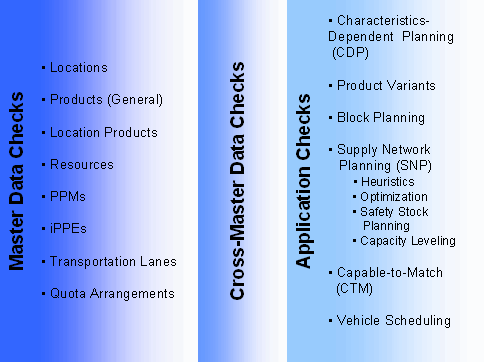
Master Data Checks:
Here you can check the consistency of the data within individual master data objects. The system determines whether all necessary information (on a field level) is maintained.
 Recommendation
We recommend that you always execute a master data check after maintaining a model in the Supply Chain Engineer (SCE).
Cross-Master Data Checks:
Here you can search for inconsistencies between master data objects.
 Example
In-house production: If in-house production is defined for a location product, the system checks whether a PPM exists for the location product.

External procurement: If external procurement is defined for a location product, the system checks whether the product is defined for a transportation lane that leads to the product.
Application Checks:
Here you can check that master data objects are used consistently in the applications. Use this check depending on your business process.
 Note
Note
For more information on individual checks, see the corresponding field helps.
Activities
To create a profile, take the following steps in the SAP APO Easy Access menu:
Choose

Master Data

Model Consistency Check
Maintain Profile.

You are now on the
Model Consistency Check: Administration Check Profiles
screen.To create a new profile, enter a profile name and a short description.
Choose
Create
.Select the relevant checks.
Choose
Save
.