 Delivery Schedule Split and Due Delivery Schedule
Use
Your customers transmit the quantities that they require in an operative delivery schedule and/or a forecast/planning delivery schedule.
Due Delivery Schedule
During inbound processing, the SAP APO system automatically creates a due delivery scheduleon the basis of the operative and the forecast/planning delivery schedules:
If you use both types of delivery schedules, the system takes the release horizon into account when creating the due delivery schedule. This means that, within the release horizon, the creation of the due delivery schedule is based on the schedule lines of the operative delivery schedule. Outside the release horizon, the schedule lines of the forecast/planning delivery schedule are used.
If you only receive operative delivery schedules or only forecast/planning delivery schedules, the system uses just one of them to create a due delivery schedule. The system copies all schedule lines to the due delivery schedule, or – if you have assigned a splitting profile – the schedule lines that lie within the validity period of the splitting profile.
Due delivery schedules are internal delivery schedules with which you can plan requirements more efficiently.
Delivery Schedule Split
You can also define that weekly or monthly quantities of which the customer informs you in the forecast/planning delivery schedule,are split ( delivery schedule split) and displayed as daily quantities in the due delivery schedule.
If you want the weekly and monthly quantities from the forecast/planning delivery schedule to be split into daily quantities then you must use the corresponding splitting profile.
If you want the requirements quantities (that is, the release schedule lines which the customer sends) to go to planning without being altered, then do not use the delivery schedule splitting profile.
Prerequisites
In Customizing for the
A
dvanced Planning and Optimization (APO)
, maintain the settings for the splitting profile by choosing

Supply Chain Planning

Delivery Schedule Processing for Sales Scheduling Agreement
Delivery Schedule Splitting.

Features
By using a delivery schedule splitting profile, you can split forecast/planning delivery schedules during inbound processing.
A due delivery schedule is then generated from the operative delivery schedule and the forecast/planning delivery schedule (which may have been split).
If you use a delivery schedule splitting profile, you can define in Customizing:
On which date the splitting of the delivery schedule is based (baseline date)
This means that you can define whether schedule lines are to be split as of the date of the delivery schedule (date on which the customer created the delivery schedule) or as of the date on which the due delivery schedule was created.
Which schedule lines are copied to the due delivery schedule and which are not (validity)
You can define, for example, that the system only copies the schedule lines for the next two months to the due delivery schedule.
Once the period of validity is over, schedule lines are no longer copied to the due delivery schedule.
Weekly and monthly quantities within the validity period are split according to the splitting rule and copied to the delivery schedule.
The system uses the baseline date and the validity to determine a period of time for which all schedule lines are copied to the due delivery schedule.
How schedule lines are split (splitting rule).
You can define how you want to split the weekly and monthly quantities into daily quantities.
For example, you may want to distribute weekly quantities equally between 5 days.
In addition you can define how holidays are to be handled and how quantities are to be rounded.
That different split rules are to be used within the validity period (delivery schedule splitting rule range).
You can define that schedule lines of different periods of time can be split according to different split rules.
You may want to split up the schedule lines of a two-month validity period differently in the first four weeks than in the following four weeks.
If different splitting rules apply for a schedule line, the system uses the rule with the shortest rule range. The system determines the range of a delivery schedule splitting using the baseline date.
If you have not defined any split rules for the schedule lines within the period of validity, the system copies them to the due delivery schedule without splitting them.

It is not possible to split daily quantities into smaller units. As long as they are within the validity of the delivery schedule splitting profile, they are copied to the due delivery schedule without being changed.
You can use the
Business Add-In(BAdI)
Modification of Delivery Schedules
(/SAPAPO/CMDS_DS_MOD) to influence the way the system splits forecast/planning delivery schedules (for example by specifying a calendar to determine non-working days) and how the system generates due delivery schedules.
You can use the BAdI
Edit Own Period Formats
(/SAPAPO/CMDS_SL_DATE) to define your own periods for sales scheduling agreement schedule lines.
See Business Add-Ins (BAdIs) for Sales Scheduling Agreements, Releases and Confirmations
Activities
To split inbound forecast/planning delivery schedules, you must carry out the following steps:
In Customizing for
Advanced Planning and Optimization
, create a delivery schedule splitting profile.Define the delivery schedule splitting rules.
Assign the delivery schedule splitting rules to the splitting profile.
Assign the delivery schedule splitting profile to the scheduling agreement control profile.
Assign the scheduling agreement control profile you want to use to the sales scheduling agreement item in the master data maintenance for the sales scheduling agreement.
Example
Split Weekly Schedule Line in the Forecast/Planning Delivery Schedule
You want to split up a schedule line containing 600 pieces (PC) for calendar week 26 (June 24 to 28).
In Customizing, maintain delivery schedule splitting rule SD1 by distributing the partial quantities equally on Monday, Wednesday and Friday.
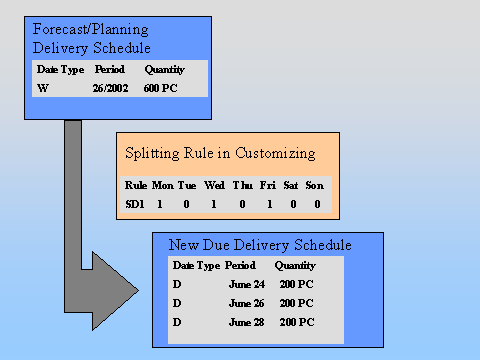
When you create the new due delivery schedule, the system calculates the average quantity by dividing the schedule line quantity of 600 PC by the three split shares.
The system then assigns this quantity of 200 PC (600 PC / 3 split shares) to the individual days.
The resulting due delivery schedule contains three daily quantities of 200 PC each.