
 List Form Selection

Which transformations are used to depict XML documents in a folder?
Case 1: Documents From Different Projects
Case Descripition
A folder contains documents from different projects, for example, news items and FAQs.
System Behavior
XML documents with different transformations are depicted within the same folder: New items using the RenderListItem transformation of the news project, and FAQs using the RenderListItem transformation of the FAQ project.
The system uses the resource type of each document to decide which project’s transformation is to be used.
The project name is an integral part of the resource type that the system writes to the properties of each document. For example, XML documents that you create using the creation form of the News project have the resource type http://sap.com/xmlns/cm/app/xmlforms/News.

You can display the resource type in the Details dialog box of documents (Settings ® Properties ® System).
Case 2: Documents From Different Projects with Your Own Forms
Case Descripition
A folder contains documents from different projects, for example, news items and FAQs.
You have also created your own forms in one or more projects, for example, a narrow form for display in a narrow iView (see Linking Your Own List Forms into iViews). The system generates a separate transformation for each form.
System Behavior
XML documents with different transformations are depicted in the same folder.
The system uses the resource type to decide which project’s transformation is used (see case 1).
The system then decides which of the transformations within the project determined is to be used. The system does this by checking whether forms are available. It does this in the sequence outlined below.

The examples below assume that you specified the value Narrow in parameter XML Forms List Renderer in the XML forms resource renderer used.
List Form Selection
|
Position |
Form Name |
System Behavior |
Example of Form Name |
|
1 |
<Parameter_Value> Hundred percent agreement |
The system checks the availability of a form with an identical name to the value of the parameter XML Forms Transformation in the resource renderer used. |
Narrow |
|
2 |
RenderListItem + <Parameter_Value> |
The system checks the availability of a form whose name is comprised of the character string RenderListItem and the value of the parameter XML Forms List Renderer. |
RenderListItemNarrow |
|
3 |
RenderListItem |
The system uses the standard list form RenderListItem. |
RenderListItem |
|
4 |
No form available with any of the above names |
The system uses the standard renderer. This only displays the document name. |
|
Example
Example: iView with XML Documents from Different Projects
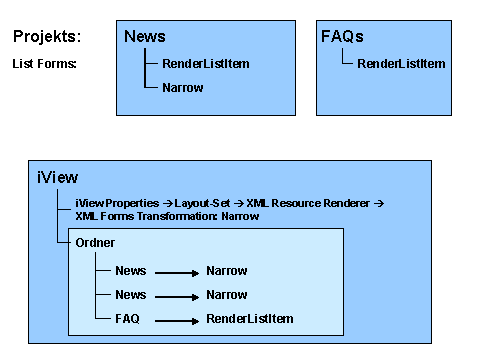
You have created two forms for lists in the News project: RenderListItem and Narrow.
You have created a single form for lists in the FAQs project: RenderListItem.
In the iView properties, you entered a layout set that contains an XML resource renderer with the transformation Narrow.
You have created three documents in the folder: Two news items and one FAQ.
The system uses the transformation Narrow to depict the news items.
There is no form with the name Narrow in the FAQs project. The system uses the transformation RenderListItem to depict the FAQs (case 3 in the list above).