
 XML
Forms Builder
XML
Forms Builder

Use
With the XML Forms Builder, you enhance the forms for news and FAQs contained in the delivery or create new forms for form-based publishing.

You can find a how-to guide on creating XML forms on the SAP Service Marketplace at service.sap.com/nw-howtoguides ® Portal, KM and Collaboration ® KM.
Prerequisites
A Java runtime environment (JRE) is installed on the client host.
The standard delivery provides the XML Forms Builder to the Content Manager role.
Features
You can use the following screen areas when working with the XML Forms Builder:
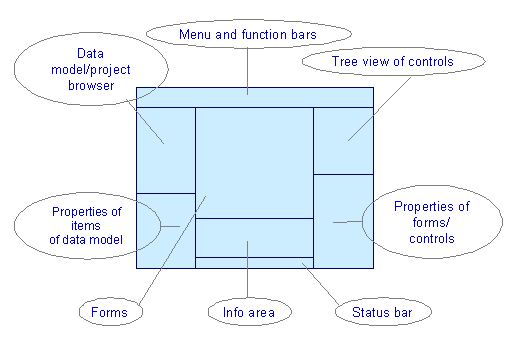
Menu and Function Bars
You use the menu bar and function bar to access the functions of the XML Forms Builder (see Function Bar). You can insert predefined visual controls in your forms from the function bar with Drag&Drop (see Controls).
Data Model
The data model is a structured description of the data that is stored in XML forms. The data that you enter in forms is written in either an XML file or in properties of documents. A combination of the two is also possible.
In the data schema, you define the structure of the elements in which the data is stored in the XML file. You can assign the elements of the data schema to namespaces following the XML standard.
Each XML document has document properties, such as the date when it was last changed. You can display the values of these properties in XML forms. You can also use changeable properties to store data that was entered in a form.
For more information, see Data Model.
Project Browser
You manage the project forms in the Project Browser. You can open, close, create, duplicate, and delete forms.
Properties of the Items of the Data Model
In this area you can display or change the properties of the items of the data model (elements of the data schema, namespaces, and document properties).
Forms
You design your forms in this area (see Forms).
Tree View of the Controls
This area displays all controls of a form in an overview tree.
You can show or hide the tree view of the controls.
Form/Control Properties
You use this table to set the properties of the forms and controls (see Form Properties and Controls ).
Info Area
This area displays errors, warnings, and information on the following tabs:
Tab Page |
Description |
Client Log |
Messages containing information on the execution of the XML Forms Builder and communication between client and server.
|
Server Log |
Messages containing information on the execution of the XML Forms Builder and communication between client and server.
|
Project Check |
Messages that indicate errors or inconsistencies in your forms (see Project Check).
|
Accessibility Hints |
Messages that indicate possible problems such as an input control not being linked with a field label.
|
Global Settings |
Cross-project settings that are defined in the configuration of Content Management.
|
You can show or hide the info area.
Status Bar
The status bar displays the status of the action most recently carried out.