 Disaggregation
Purpose
This process describes how the system disaggregates forecast results to all child locations of a bill of distribution (BOD). The system calculates the forecast on the basis of aggregated demand history on the level of the entry location. Disaggregation is based on a choice of location products that are assigned to BODs. The system distributes the forecast results of the entry location for the chosen location products along the hierarchy levels of the BOD. The system defines ratios, according to which it distributes the forecast demand to the child locations, on the basis of the results for the location period. It does so for each forecast period.
Prerequisites
You have created a service profile for forecast disaggregation in Customizing for
Advanced Planning and Optimization
, under
Supply Chain Planning

Service Parts Planning (SPP)
Forecasting
 in the IMG activity
 Define Forecast Service Profiles.
 Note
NoteIf you are using the leading-indicator-based forecasting and the system to disaggregate these forecast results as well, have set the
Consider Leading Indicator
flag in the service profile for forecast disaggregation.End of the note.In the Customizing for
SCM Basis
underPlanning Service Manager
in the IMG activityDefine Planning Profile
you have created a planning profile for the forecast disaggregation service.For more information, see Use of the Planning Service Manager in SPP and PSM Services for Forecasting .
Process
If you have scheduled forecast disaggregation as a planning service in the Planning Service Manager (PSM), or saved the interactive forecast from the SAP Easy Access
menu under AdvancedPlanning and Optimization
Service Parts Planning (SPP)
Planning
Forecasting
InteractiveForecasting
, the system executes the disaggregation as follows:
The disaggregation planning service firstly defines the start locations; that is, the locations on the top level of the BOD. Start locations are entry locations by default. However, if you change the interactive forecast manually, the disaggregation service can also start at other locations and levels of the BOD.
The system disaggregates the forecast results from the start locations of all levels of the BOD down to the customer-facing locations on the lowest level of the BOD. This means that the system disaggregates the source key figures (SKF) to the target key figures (TKF) according to the basic key figures (BKF).
Source, basic, and target key figures are key figures in the
Forecast Data
time series. You can define this time series in the Customizing forAdvanced Planning and Optimization
, under Supply Chain Planning
Service Parts Planning (SPP)
Forecasting
in the IMG activity Define Forecast Service Profiles
under the menu optionGeneral Data.
You can define the source, basic, and target key figures under theDisaggregation Key Figures
menu item.The number of forecast periods, which is defined in the forecast profile of the start location, is the same as the number of periods that the system disaggregates.
The system defines the forecast values, which the system disaggregates to each child location, and the disaggregation ratio according to the source key figures and the basic key figures. The source key figure is the aggregated forecast result of the start location. The basic key figures define the disaggregation ratio. Using these two values, the system calculates target key figures for each child location. These define the forecast results for each child location.
The system calculates target key figures according to the following formula:

The calculated target key figures are the source key figures for disaggregation to the next level.
The system treats virtual child locations like any other child locations; it considers them during disaggregation depending on their base value.
Example
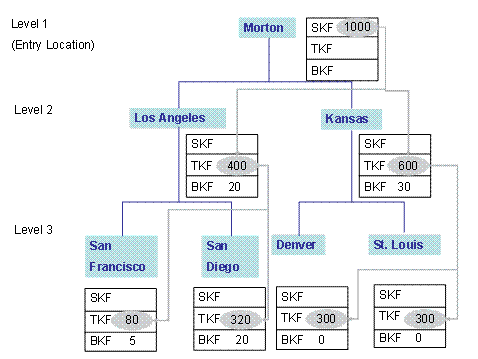
In this example, the system disaggregates forecast values throughout a three-level BOD. This consists of the entry location Morton, the locations Los Angeles and Kansas on the second level, and the customer-facing locations San Francisco, San Diego, Denver, and St Louis on the third level.
The source key figure, which is to be disaggregated, of the entry location is 1000.
The system now calculates the target key figures for Kansas as follows:
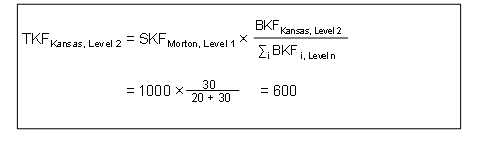
The system multiplies the source key figure from Morton by the basic key figure from Kansas divided by the sum of the basic key figures from Kansas and Los Angeles.