 Reorder-Point-Based Planning
Use
Reorder-point-based planning is the alternative to period-based planning. You can decide for each separate location product which of these two planning modes the system uses for distribution requirements planning (DRP). In period-based planning, DRP checks whether the forecast service has forecast demand for a subsequent period, and then it carries out replenishment planning accordingly. In reorder-point-based planning, DRP does not take the forecast results into account and carries out replenishment planning statically by comparing the current stock with a reorder point defined by you. Whenever the current stock and the planned receipts drop below this reorder point, DRP plans the procurement of replenishment in order to cover demand over the replenishment lead time. Reorder-point-based planning is therefore particularly well-suited for slow turnover location products and for location products for which there is no demand history (or no reliable demand history), meaning that the system cannot create any reliable forecasts.
Prerequisites
Master Data
If you want to work with reorder-point-based planning, you need to make the following settings in the location product master data on the
SPP DRP
tab:
You either specified the DRP planning mode you require in the DRP planning mode field or you set the
Trigger Determ. of DRP Planning Mode
indicator. For more information about these settings, see the sectionDetermining the DRP Planning Mode for a Location Product
.You made the necessary settings in the
DRP ROP Planning
area.
Customizing
You have executed the Implementation Guide (IMG) activity
Define Service Profile for DRP Planning Mode
.If you want the system to determine the DRP planning mode for a location product, execute the IMG activity
Make Settings for the BAdI for DRP Planning Mode
.
For more information about these IMG activities, see the Implementation Guide for
Advanced Planning and Optimization
under

Supply Chain Planning

Service Parts Planning (SPP)
Distribution Requirements Planning (DRP)
Determination of DRP Planning Mode
 .
.
Features
Determining the DRP Planning Mode for a Location Product
You have the following options for determining the DRP planning mode for a location product:
You can specify the planning mode manually for each location product in the location product master data on the
SPP DRP
tab in theDRP Planning Mode
field.You can set the
Trigger Determ. of DRP Planning Mode
indicator in the location product master data on theSPP DRP
tab. In this case, the forecast release service sets the SPP_FCST_CHG_PLNMODE trigger, which triggers the planning serviceSPP: Determination of DRP Planning Mode
(SPP_DRP_PLANNING_MODE). This planning service calls up the Business Add-In (BAdI)BAdI: Determine DRP Planning Mode
(/SAPAPO/DRP_PLANNING_MODE), which determines the DRP planning mode of a location product. In the standard implementation supplied by SAP, the BAdI checks whether, during the last 12 months, the number of sales order schedule lines for a location product has exceeded or equaled the number you entered as the upper limit for reorder-point-based planning.If this is the case, the system plans this product in period-based planning mode, otherwise the system plans this product in reorder-point-based planning mode. You can specify the upper limit in Customizing underMake Settings for BAdI for DRP Planning Mode
(see prerequisites). For more information about the BAdIBAdI: Determine DRP Planning Mode, see the Implementation Guide (IMG) forAdvanced Planning and Optimizationby choosingSupply Chain Planning
Service Parts Planning (SPP)
Business Add-Ins (BAdIs) for Service Parts Planning (SPP)
BAdIs for Distribution Requirements Planning (DRP).
If the planning mode that the system determines is different than the previous planning mode, there are two options:
The system changes the entry in the
DRP Planning Mode
field in the location product master data and generates the alertDetermination of DRP Planning Mode
(alert type 7888), which informs you that the master data entry has changed.The system generates the alert
Determination of DRP Planning Mode
(alert type 7888), which informs you that the planning mode determined by the system is different than the planning mode you defined. In this case, you can check the planning mode and change it manually in the location product master data, if necessary.
You can define which of these options the system uses in the EV_ACTION export parameter in the DETERMINE_PLAN_MODE BAdI method.
DRP Planning Modes Within a Bill of Distribution (BOD)
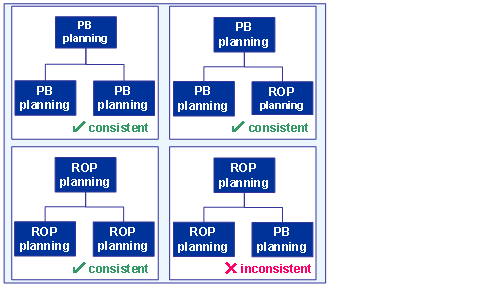
The DRP planning modes have to be consistent within a BOD. In other words:
If you use period-based planning for a child location, you also have to use period-based planning for its parent location.
If you use reorder-point-based planning for a parent location, you also have to use reorder-point-based planning for all of the parent’s child locations.
 Example
The following diagram shows some examples of which constellations are possible within a BOD and which are not:
 End of the example.
If the DRP planning modes are not consistent within a BOD, the system generates the alert
Inconsistency of DRP Planning Modes in BoD
(alert type 7868).