 Forecast Profile Inheritance
Use
The system can pass on forecast profiles down the following hierarchy from top to bottom:
Planning version 000 (active version)
Planning version other than 000
Location
Product
Location product
Location product with virtual child location or location product with third-party order processing (TPOP)
If you work with the leading indicator forecast, the system passes the forecast profile of the location product or location product with virtual child location to the leading indicator and to the coefficients.
Features
In the following cases, the system passes on a forecast profile to all hierarchy levels that do not have their own forecast profile and then saves it:
You change and save the forecast profile on the
SAP Easy Access
screen under
Advanced Planning and Optimization

Service Parts Planning (SPP)
Planning
Forecast
 on either the
Interactive Forecast
or theForecast Profile
screen.When the system executes forecast services, it reads and saves the forecast profile.
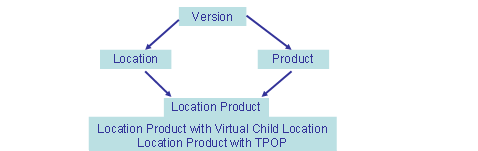
You can change parameters on all levels. The system passes the changed parameter downward from the hierarchy level on which the change was made. If you change a parameter on the version level, the system passes the changed parameter from the version to the location. If you have changed a parameter on the version level that applies to the product and not the location, the system passes this on to the product, not to the location. If you change a parameter on the product or location level, or if the system passes a parameter from the version on to the location or the product, the location or product then passes the changed parameter on to the location product, the location product with virtual child location, or the location product with TPOP. However, if you change parameters on the location product level, the system does not pass this on to location products with virtual child locations nor location products with TPOP.
The following figure shows the paths via which the system passes on changed forecasting parameters:
Leading Indicator Forecast
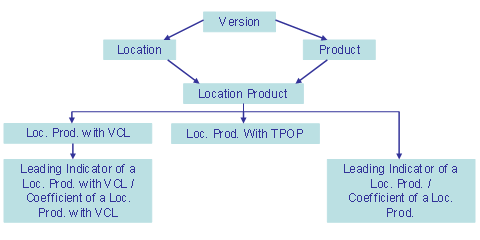
If you work with the leading indicator forecast and assign a leading indicator or coefficient (without its own forecast profile) to a location product, the system passes on the forecast profile of the location product or the location product with virtual child location (VCL) to the leading indicator or coefficient.
The following figure shows the paths via which the system passes on a forecast profile to a leading indicator or coefficient.
Lock
If you have set a lock for a parameter, the system does not pass this parameter on downward. You can set locks on the
SAP Easy Access
screen under
Advance Planning and Optimization
Service Parts Planning (SPP)
Planning
Forecast
on either the
Interactive Forecast
or the
Forecast Profile
screen. To do so, set an indicator next to the padlock icon for the respective parameter.
Example
Forecast profiles are available for the active planning version 000, location one, and product one. There are no forecast profiles available for location product one and location product one with virtual child location.
If you want to display the forecast profile for location product one, the system displays the forecast profile for product one. Since location product one does not have its own forecast profile, the system passes down the forecast profile next highest in the hierarchy. In this case this is the forecast profile for product one. The system also displays the same forecast profile for location product one with virtual child location.
As soon as you change and save one or more parameters in the forecast profile that the system has passed on to the location product, the system creates a separate forecast profile for the location product.
If you want to display the forecast profile for location product one with virtual child location, the system no longer displays the forecast profile for product one, but the forecast profile for the location product.