 Data Realignment at BOD Change
Use
If you want to plan with new bills of distribution (BODs) as of a certain point in time in the future, the system must realign the data for the demand history of the affected location products.
If, for example, you change the entry location within your BOD, your BOD changes. Due to this change, the demands of the previous and new entry locations may change. For each location product of the BOD, the system must create a demand history up to the point at which the new BOD is valid and a demand history as of the point at which the new BOD is valid.
Prerequisites
You have scheduled the following planning services in the Planning Service Manager (PSM):
SPP: Create Demand History Future BOD (SPP_PDEM_BOD_ASSIGN)
SPP: Delete Demand History Future BOD (SPP_PDEM_BOD_ASSIGN)
SPP: Data Realignment for BOD Change (SPP_PDEM_BOD_VALID)
For more information, see Use of the Planning Service Manager in SPP and PSM Services for Demand History Creation .
Features
The system saves the demand history of the current valid BOD in the MultiProvider 9ADEMMUL. The system saves the demand histories for the future BOD in the DataStore object 9ADEMBOD.
Triggers
If you assign a new BOD to a product in the master data for
Advanced Planning and Optimization
under
Master Data

Application-Specific Master Data
Service Parts Planning (SPP)
Bill of Distribution
 , the system sets the
trigger
SPP_NEW_BOD_ASSIGN.
, the system sets the
trigger
SPP_NEW_BOD_ASSIGN.
If the date at which the future BOD becomes valid is in the future, this trigger triggers the planning service “SPP: Create Demand History Future BOD“. This planning service does not delete the trigger SPP_NEW_BOD_ASSIGN to always keep the demand history of the future BOD up-to-date.
If the date at which the future BOD is valid is current or lies in the past, this trigger triggers the planning service “SPP: Data Realignment for BOD Change”. This planning service deletes the trigger SPP_NEW_BOD_ASSIGN after it has performed the data realignment steps.
If you delete the assignment of a product to a future BOD in the master data for
Advanced Planning and Optimization
under Master Data
Application-Specific Master Data
Service Parts Planning (SPP)
Bill of Distribution
, the system sets the trigger SPP_BOD_DELETE. This trigger triggers the planning service “SPP: Delete Demand History Future BOD”. After this planning service has deleted the demand history of the future BOD, it also deletes the trigger SPP_BOD_DELETE.
Each of the planning services under
Prerequisites
sets the trigger SPP_RLG_DONE_BOD as the final step. This trigger triggers the forecasting service, phase-in planning, and the planning services for the stocking/destocking decision.
Planning Service “SPP: Create Demand History Future BOD”
If you create a future BOD in the master data, this planning service creates the demand history for future BODs. To do so, it first deletes all demand histories of this product for already defined future BODs in the DataStore object 9ADEMBOD. It then reads the data for the future BOD that you have just defined from the MultiProvider 9ARAWMUL and uses it to create the demand history for this future BOD. The planning service saves this demand history in the DataStore object 9ADEMBOD.
 Example
The following figure shows a three-level BOD. The entry location Frankfurt is on the first level. On the second level there are the child locations of the entry location Dallas and Oslo, and the virtual child location(VCL) Frankfurt. On the third level there are the child locations of Oslo, namely Helsinki and Montreal, and the VCL Oslo.
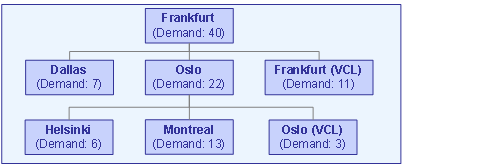
You replace this BOD with a new BOD, where Montreal is the entry location instead of Frankfurt. The entry location Montreal is on the first level. On the second level there are the child locations of the entry location Frankfurt and Dallas, and the VCL Montreal. On the third level there are the child locations of location Frankfurt, namely Helsinki and Oslo, and the VCL Frankfurt. With this change the demands of the individual locations change since the system aggregates the demand via different paths.
The following figure shows the new BOD:

The following table shows how the demands change:
Location |
Demand in Previous BOD |
Demand in New BOD |
|---|---|---|
Frankfurt |
40 |
20 |
Dallas |
7 |
7 |
Oslo |
22 |
3 |
Frankfurt (VCL) |
11 |
11 |
Helsinki |
6 |
6 |
Montreal |
13 |
40 |
Oslo (VCL) |
3 |
--- |
Montreal (VCL) |
--- |
13 |
Planning Service “SPP: Delete Demand History Future BOD”
If you delete a future BOD in the master data, this planning service also deletes the demand history of this future BOD from the DataStore object 9ADEMBOD.
Planning Service “SPP: Data Realignment for BOD Change”
This planning service carries out the demand history realignment when the future BOD becomes valid.
The planning service deletes the demand history for the previous product-BOD assignment with a delta method in the MultiProvider 9ADEMMUL.
The planning service deletes the demand history of the future BOD that is now valid from the DataStore object 9ADEMBOD.
The planning service uses the data from the MultiProvider 9ARAWMUL to create the demand history of the BOD that is now valid, and saves this demand history with a delta method in the MultiProvider 9ADEMMUL. To ensure that the demand history is up-to-date, the planning service does not take the demand history of this future BOD directly from the DataStore object 9ADEMBOD.
If there were changes in the location determination procedure the planning service adjusts the raw data in the MultiProvider 9ARAWMUL accordingly with a delta method.
The planning service writes data realignment steps. For more details, see Realignment .