
 Search
and Classification Engine TREX
Search
and Classification Engine TREX

Purpose
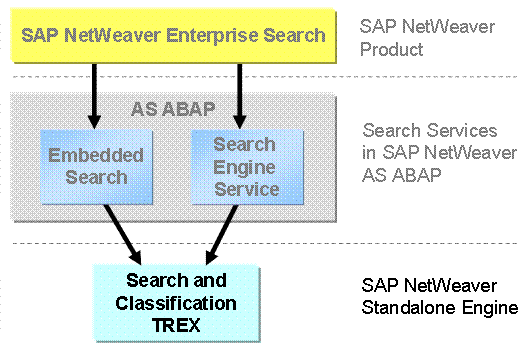
The SAP NetWeaver standalone engine Search and Classification TREX provides SAP applications with numerous services for searching, classification, and text-mining in large collections of documents (unstructured data) as well as for searching in and aggregating across business objects (structured data). As a back-end engine, TREX provides search application such as SAP NetWeaver Enterprise Search and search services such as Search Engine Service and Embedded Search with indexing and search technologies. TREX as an SAP NetWeaver standalone engine is a significant part of most search features in SAP applications. TREX cannot be licensed as a separate product.
The following figure depicts TREX as part of the SAP NetWeaver Search Technologies:

The TREX APIs
are not open for customer development. But TREX functions and services can be
accessed through the APIs of SAP applications that provide configurable access
to TREX services (for example SAP NetWeaver
Enterprise Search, Embedded Search,
Search Engine
Service (SES), and
 Enterprise Knowledge
Management).
Enterprise Knowledge
Management).
TREX Architecture
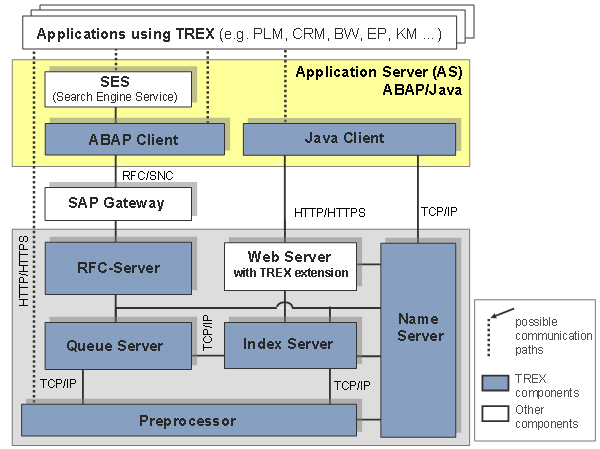
The following graphic depicts the different components of TREX:
TREX Components
TREX comprises the following central components:
● Java client and ABAP client
TREX provides programming interfaces (Application Programming Interfaces, APIs) for the languages Java and ABAP, which allow access to all TREX functions. The Java interface (Java client) is part of the Application Server (AS) Java as a TREX service. The ABAP interface (ABAP client) is part of the Application Server (AS) ABAP. These APIs are released for SAP-internal development only.
● Web server with TREX extension
The Web server is responsible for the communication between Java applications and the TREX servers. A TREX component that enhances the Web server with TREX-specific functions is installed on the Web server.
● RFC Server
The RFC server is responsible for the communication between an SAP system and the TREX servers. The SAP system sends requests to an RFC server using an SAP Gateway. The RFC server converts the requests to a TREX-internal format and then forwards them to the responsible TREX servers.
● Queue server
The queue server coordinates the processing steps that take place during indexing. It collects incoming document, triggers preprocessing by the preprocessor, and further processing by the index server.
● Preprocessor
The preprocessor preprocesses documents and search queries. Document preprocessing comprises several steps: Loading documents, filtering documents, analyzing documents linguistically. During search queries, the preprocessor performs a linguistic analysis.
● Index server
The index server indexes and classifies documents and answers search queries. The processing takes place in the engines that belong to the index server: Search engine, text-mining engine, attribute engine.
● Name server
The name server manages information on the entire TREX system. It makes sure that the TREX servers can communicate with each other and that they receive all necessary information. It is always active but becomes especially important in distributed multi-host TREX landscapes. The name server has the following tasks: Managing topology data, coordinating replication services, balancing the load, and ensuring high availability.

For TREX
details, see the engine documentation for
Search and
Classification TREX.
Search Engine Service (SES)
The Search Engine Service (SES) enables users to search for business objects. SES is not a TREX component, it is part of the SAP NetWeaver Application Server (AS) ABAP. SES accesses the TREX functions through the TREX ABAP client. SES replicates the business objects from the ABAP application to TREX, so that it can apply TREX indexing and search functions to them. When a user enters a search query, the TREX system responds to it, not the database for the ABAP application.
TREX Scalability and Distribution
Search and Classification (TREX) offers a flexible architecture and can be adapted to different requirements. You can scale TREX if necessary. Your options range from a minimal system with one host, to a large distributed server landscape.
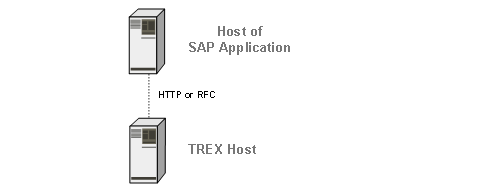
Single-Host System
A minimal TREX system consists of a single host that provides all TREX functions (indexing, classification, and searching). You can use a minimal system as a demo and test system, or as a production system. For a production system, SAP recommends that you install TREX on a dedicated host that is used exclusively for TREX.
Multiple-Host System
You have numerous options for scaling TREX. You use a scaled scenario to distribute the search and indexing load among several hosts and to ensure the availability of TREX. In a multiple-host system, the individual hosts are responsible for different tasks depending on which TREX components run on them. For example, you can set up dedicated search servers with copies of the original indexes and configure automatic index replication to keep the copies up-to-date.
Example
The graphic below shows an example for a distributed TREX system:
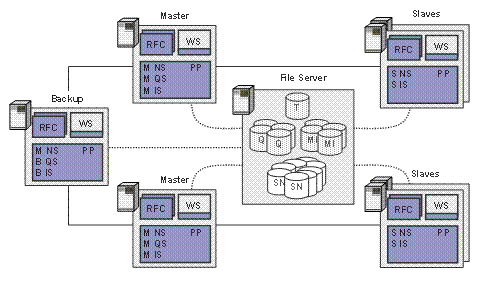
Explanation of abbreviations:
● Master Server: M NS = Master Name Server; M QS = Master Queue Server; M IS = Master Index Server
● Slave-Server: S NS = Slave Name Server; S IS = Slave Index Server;
● Backup-Server: B NS = Backup Name Server; B QS = Backup Queue Server; B IS = Backup Index Server
● Other Servers: RFC = RFC Server; WS = Web Server; PP = Preprocessor
● Data: Q = Queue; MI = Master Index; SI = Slave Index; SN = Index Snapshot; T = Topology File
For details on TREX distribution options and implementation, see the Configuration Guide Distributed Search and Classification (TREX) Systems on SAP Service Marketplace service.sap.com/instguidesNW70