
 Development Scenarios with Development
Infrastructure
Development Scenarios with Development
Infrastructure

You use the SAP NetWeaver Development Infrastructure (NWDI) in the following way:
...
1. Phase 1: Setting up the NWDI environment.
In this administrative phase you set up the entire development environment. You create the users and assign permissions. Then you create the development configuration and the software components (SCs).
2. Phase 2: Working with the development configurations in the SAP NetWeaver Developer Studio.
In this development phase, it is sufficient to generate a development system purely for the development phase without an extra consolidation system. You import the development configurations which were automatically created with the CM Services or the track to the development workplace and the development processes take place.
3. Phase 3: Introducing a consolidation phase with transfer to production.
In this administrative phase the process of transferring the software is usually done by a quality manager. You have the successfully built product, and now you generate deployable files that you distribute to your customers.
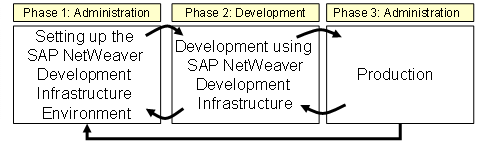
Software Development Lifecycle
The development scenario you choose determines both the NWDI services that are used and the exact development steps that are required.
Java Development With a Central Storage for the Source Files
Use the SAP NetWeaver Developer Studio as the development environment and the Design Time Repository (DTR) to store your source files in versions.
You can use this scenario to integrate existing Java or Java EE applications into the NWDI.

This scenario provides unlimited support for plain Java and Java EE projects only. If you decide later on to use the SAP’s component model, this may require a lot of manual work. Therefore, it is important to decide right from the beginning which scenario you want to use.
For more information, see Java Development with DTR as Central Storage for the Source Files.
Developing Components With the NWDI
Here you perform the development in the Developer Studio in accordance with the SAP’s component model. Using the SAP’s component model allow developers to organize their projects right from the start in small, reusable and easy-to-maintain units. In addition, to administer the development landscape you use the Transport Management System (TMS) of AS ABAP, in which the development configurations are created. For the central build process, you use the Component Build Service (CBS). The development is restricted to developing one SC. The files are stored in DTR.
You can use this type of development also for layered development of several SCs that are based on each other.
Development configurations describe and select all required resources of the infrastructure that a developer needs to work on a software product. However, you can develop several logically-related SCs in parallel.
For more information, see Components Development with the NWDI.