

 Forward Rate Agreements (FRAs)
Use
You can use forward rate agreements to specify a fixed interest rate today for a period in the future.
Buyers of FRAs cover themselves against rising interest rates, while sellers of FRAs cover themselves against falling interest rates.
 Example:
In 6 months time you will receive 1 million euros, which you want to invest as 3-month money. Since you are currently expecting the interest rates to fall, you arrange a FRA for 1 million euros with your bank today with a starting date in 6 months for a term of 3 months. The agreed interest rate is 5%.
If, for example, the reference interest rate on the fixing date is 4.5%, the bank has to make a settlement payment to you. If the interest rate on the fixing date is above the agreed interest rate of 5%, you have to pay the difference.
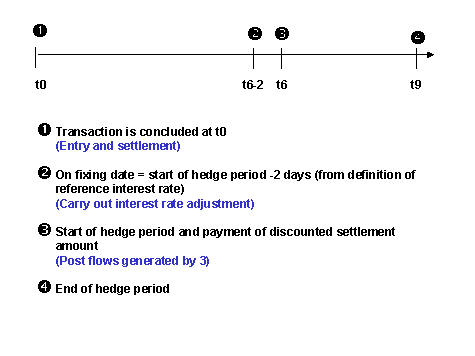
Features
Calculating the settlement payment for the standard FRA:
Calculating the settlement payment for the discount FRA:
Activities
 Enter to go to the basic data screen for the transaction. On the
  Structure tab page, enter the actual transaction data for the FRA.
a. Term area:
b. Interest structure area:
è A "6 on 9" FRA has a contract period of 3 months with the start of term in 6 months. At this point in time, the contract is settled and paid out.
c. Business calendar area:

For more information, see
 Save.
Save.For more information about options on FRAs, see Interest Rate Guarantee (IRG).
For general explanations on terms, see Basic Data.