 Setting Publishing Options

Setting Publishing Options
Use
You use this procedure to set
publishing options for Internet Transaction Server (ITS) files.You can set the options listed in the following table:
Option |
Description |
Default |
Switch syntax checking on/off. |
If this option is selected, the SAP@Web Studio always performs a syntax check on files when publishing. |
Selected |
Select files and site before publishing. |
If this option is selected, the SAP@Web Studio displays a dialog, which allows you to select the site you want to use for publishing and the files you want to publish. If this option is deselected, the SAP@Web publishes all the files in the active service to the active site without displaying the dialog. |
Selected |
Do not ask whether to overwrite newer files. |
If this option is selected, the SAP@ Studio overwrites any files that are the same or newer without asking first. |
Deselected |
Do not ask whether to overwrite read-only files. |
If this option is selected, the SAP@Web Studio overwrites read-only files without asking first. |
Deselected |
Switch file publishing on/off. |
If this option is selected, the SAP@Web Studio always publishes files when you start a service. |
Selected |
Record context data values. |
If this option is selected, the SAP@Web Studio records the data values generated for each HTML template at runtime. You can also switch on this option when you start the service. |
Selected |
Procedure
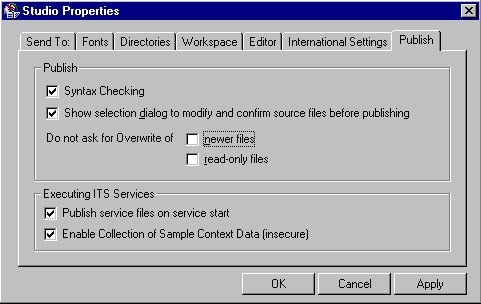
Publish group box
Executing ITS Services box
Result
The SAP@Web Studio applies your settings.