 Query Area for InfoSet Query

Query Area for InfoSet Query
After starting the InfoSet Query, the initial screen is displayed. The initial screen is divided into three areas, containing all the necessary information to create, change and execute a query. Aside from a few dialog boxes, this is the only screen for the InfoSet Query.
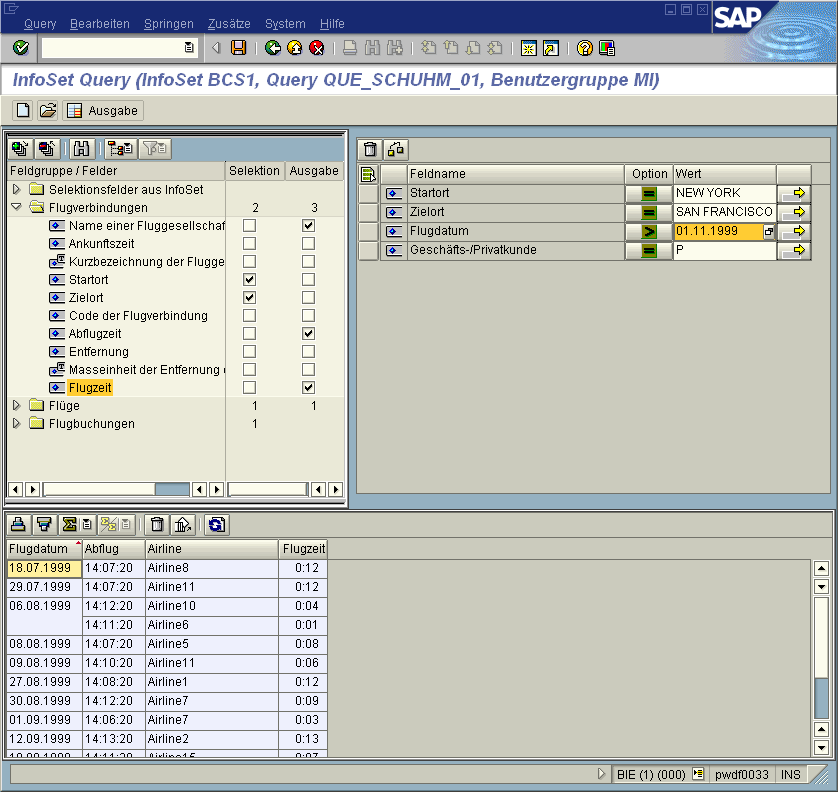
The current InfoSet is displayed in the top left-hand corner of screen. You can choose between three display options:
You can open another screen area under the InfoSet display, to display technical information on a selected field.
The selections used as options for reading the dataset are displayed in the top right-hand corner of the screen. Selections are criteria according to which the report evaluates the database and generates a result list.
The output preview is displayed in the lower area of the screen, as long as output fields have been selected. You can edit the output at this point. For example, you can change the order of the columns, form totals and subtotals or display the results list of the query.
Additional Functions
You can use the function Jump ®
Variant Maintenance to maintain variants for a query.The Goto ® Report assignment function can be used to maintain entries in the Report-Report-Interface.

The query loaded as a template (and not saved) or the last one used is always the one to be maintained. This means that you can make the entries straight after loading a query.
See also:
Display Variants when Starting the InfoSet Query