

 Using the Data Transfer Data Structure
If you want to write data to a batch input session or to process the data using
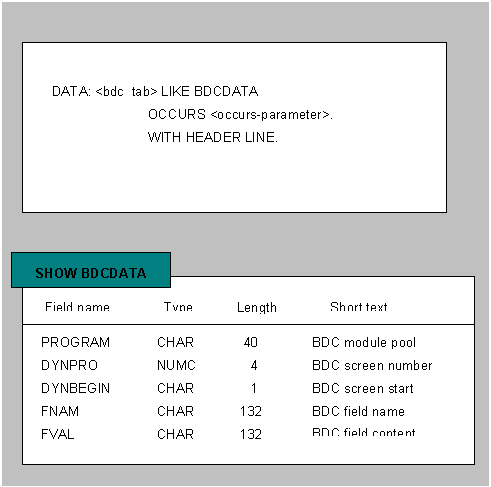
CALL TRANSACTION USING or CALL DIALOG , you must prepare an internal table <bdc_tab> . This internal table must be structured according to ABAP Dictionary structure BDCDATA. The internal table <bdc_tab> stores the data that is to be entered into R/3 System and the actions that are necessary to process the data. You can think of the table as storing the script that the R/3 System is to follow in processing batch input data.
The graphic below shows how to declare the internal table
<bdc_tab> in your ABAP program and the fields contained in the structure BDCDATA.
Process flow

The following table shows what the contents of a BDCDATA structure might look like. This BDCDATA structure would add a line to a report in Transaction SE38, the ABAP Editor:
BDCDATA Structure for Adding a Line to a Report (Transaction SE38)
PROGRAM |
DYNPRO |
DYNBEGIN |
FNAM |
FVAL |
SAPMS38M |
0100 |
X |
||
|
RS38M-PROGRAMM |
<Name> | |||
|
RS38M-FUNC_EDIT |
X | |||
|
BDC_OKCODE |
=CHAP (Change function code) | |||
SAPMSEDT |
2310 |
X |
||
|
RSTXP-TDLINECOM(1) |
B- | |||
SAPMSEDT |
2310 |
X |
||
|
BDC_CURSOR |
RSTXP-TDLINECOM(1) | |||
|
RSTXP-TDLINE(1) |
BDC Test Text | |||
|
BDC_OKCODE |
/11 (Save function key) | |||
SAPMSEDT |
2310 |
X |
||
|
BDC_OKCODE |
/3 (Back function key) | |||
SAPMS38M |
0100 |
X |
||
|
BDC_OKCODE |
/15 (Quit function key) |