

 Hierarchy Variant
Definition
The hierarchical structure of the funds centers of an FM area is represented in a hierarchy variant.
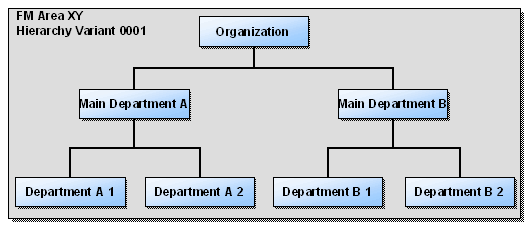
Use
A funds center hierarchy is created in the system as a hierarchy variant. After creation, hierarchy variants are initially fiscal year non-dependent. Only the assignment of the hierarchy variant to a fiscal year causes the defined funds center hierarchy in it to become valid for the respective year.
You can create several hierarchy variants for each FM area in the system. However, only one hierarchy variant is allowed for one fiscal year. The hierarchy variant assignment for a fiscal year can no longer be changed; you make the assignment in Customizing.
For more information, see Public Body Funds Management in the implementation guide, under the Assign Hierarchy Variant to FM Area IMG activity.

You can only assign a hierarchy variant to a fiscal year if all its funds centers have a valid existence interval for the fiscal year.
Year-Independent Funds Centers
If you use year-independent funds centers, then a hierarchy variant is valid for all fiscal years. The hierarchy variant is assigned to fiscal year "0000".
Note that a change from year-independent to year-dependent funds centers is possible. Switching back to a year-independent funds center is, however, not possible.
Year-Dependent Funds Centers
If you are using a year-dependent funds center hierarchy, you must maintain the hierarchy variant assignment at every fiscal year change. If there are no further changes to the funds center hierarchy in the next fiscal year, you can use the currently assigned hierarchy variant for the new fiscal year. You are able to copy hierarchy variants, modify them and save them as new hierarchy variants if there is only a slight variance. For an example scenario, see
Example: Changing Existence Intervals.
Year-independent funds centers are provided in the standard system. To convert to year-dependence, go to Customizing for Public Body Funds Management and start the activation program in the Activate Year-Dependent Master Data IMG activity.
For more information, see the implementation guide, under Master Data ®
See also:
Funds Centers Creating Hierarchy VariantsImplementation guide for Public Body Funds Management, Create Hierarchy Variant IMG activity.
Implementation guide for Public Body Funds Management, Assign FM Area to Hierarchy Variant IMG activity.