

 Variant Conditions in Sales
Use
In Sales and Distribution, you can use variant conditions to define surcharges and discounts for configurable materials, depending on the characteristic values you assign.

If a customer wants a car with a sunroof, the net price is increased by a surcharge of $2000.
You create variant conditions with reference to a material, a distribution channel, and a sales organization.
Prerequisites
You have created a characteristic that refers to table SDCOM, field VKOND. The characteristic is assigned to the variant class for the configurable material.

An object characteristic with a reference to the table SDCOM field VKOND is multi-value because several variant conditions can be entered.
Process Flow
1. You maintain condition records for the variant conditions in the sales data of the material master record for the configurable material.
2. You create a procedure where you enter the reference from the characteristic to the structure SDCOM and the variant key.
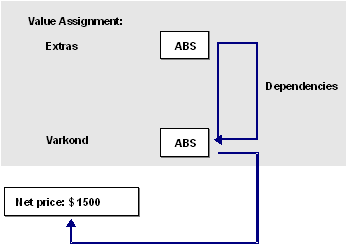
CHAR_VARCOND = 'ABS' if EXTRAS = 'ABS'
- You have created a characteristic, CHAR_VARCOND, that refers to table SDCOM, field VCOND.
- The variant condition ABS with the amount $1500 was maintained in the master data of sales and distribution.
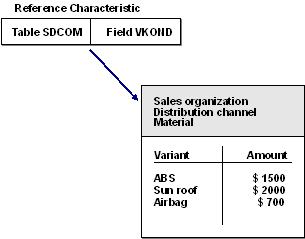
3. You assign the procedures to either the characteristic values that trigger the variant conditions or the configuration profile, depending on the condition defined in the procedures.
4. You configure the material in the sales order.
5. The net price for the material is displayed in the configuration editor.
If a value that triggers a variant condition is selected when you configure a material in a sales order, the price of the material displayed under Net value is automatically increased or reduced. In addition, the Conditions pushbutton is displayed. If you choose this pushbutton, you see which conditions have influenced the price.
See also:
 Creating Reference Characteristics