

 Connection Establishment Using Destination (SM59)
For the system to be able to establish a connection using a destination by means of the method CL_HTTP_CLIENT=>CREATE_BY_DESTINATION, the appropriate entries must be made for the HTTP connection in transaction SM59.
There are two types of HTTP connection in SM59:
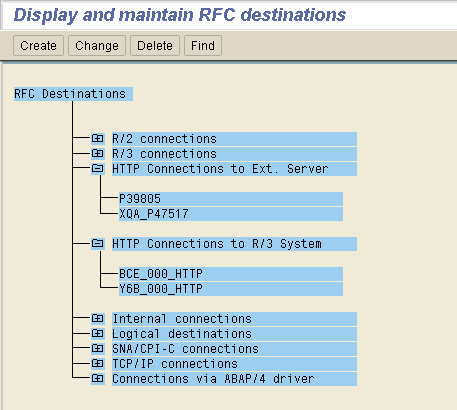
The HTTP connection to the external server and the HTTP connection to the R/3 system are different only in their logon procedures. Their technical settings are the same.

You can make the following entries:

Note that if you are using HTTPS as a protocol, you have to specify the full host name (with domain).
 Parameterizing the ICM and the ICM Server Cache.
The tabstrip Logon/Security is different, depending on whether you choose HTTP Connection to ext. Server or HTTP Connection to an R/3 System.
HTTP Connection to Ext. Server
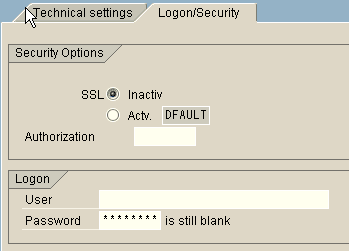
Here, you can activate SSL to ensure that HTTPS is the protocol used (if you select SSL, make sure that the correct port is entered under Technical settings). In the security transaction you can determine which type of SSL client is used.
You can also set permissions for using the destination and specify a user name and password.
HTTP Connection to an R/3 System
Here, you can specify more settings for authentication on the destination system.
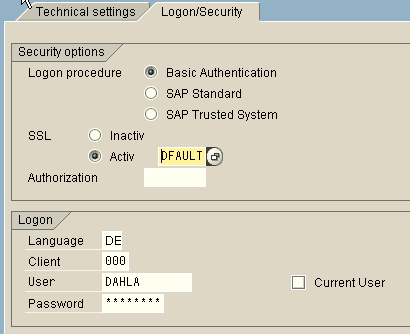
As with an external server, SSL can be activated or deactivated, and permissions can be set for it.
Because the destination system is an SAP System, you can set the client and language for the logon as well as the user name and password. If you check Current User, you have to specify the password.
The following authentication procedures are available: Basic Authentication, SAP Standard, and SAP Trusted System.